Green Hat Expert

  • Home
  • Social Media
    • Instagram
    • TikTok
    • Snapchat
    • Facebook
    • YouTube
    • Twitter
  • Messaging
    • Discord
    • Telegram
    • Whatsapp
  • About
  • Submit Guest post
You are here: Home / Archives for Social Media

12 Best Gramblr Alternatives for Instagram Posting – (2025 Updated)

Last Updated on December 25, 2024 By Arsalan Rauf

Gramblr is not working now. So that is why I am writing this guide.

If you are looking for alternatives to Gramblr, you are in the right place.

What is Gramblr?

Gramblr is a desktop software that allows you to upload images/pictures and videos to your Instagram account. In order to perform this task, you do not require an android application.

It came into existence in 2008 and it supports the windows operating system and Mac. So Gramblr is currently unavailable, which is why you are finding alternatives.

The tool was providing free Instagram likes free of cost.

12 Best Gramblr Alternatives That Work in 2025

1. Flume

Flume is the best alternative to Gramblr. It brings the world of Instagram to your desktop computer. The pro version of this app allows you to upload videos and photos directly.

Features of Flume:

  • Offers multiple accounts: Add as many accounts as you want
  • Insights and promotions: The user can see the stats of followers and posts if he/she is using Instagram business profile.
  • Direct messaging
  • Activity: The user can see the latest activities by getting desktop notifications
  • Photo focus
  • Better search
  • Explore popular content
  • Translations for international followers
  • Available in 25+ languages

2. Later

It is the top marketing platform for Instagram. This is a simple way to plan, schedule and analyzes your visual marketing on Instagram, Twitter, Pinterest and Facebook.

Features of Later:

  • Plan posts of the whole week within 20 minutes.
  • Visual content calendar.
  • Plan your feed with drag and drop.
  • Auto publishes features is available for business profiles of Instagram.
  • It is 100% safe.
  • Instagram partner.
  • Import media from anywhere including Google drive and Dropbox etc.
  • Search and find your content in a jiffy.
  • Switch Instagram accounts with ease.
  • Analyze content performance.

3. Grum

It is another site to manage your social media account that is, Instagram from the web. This site will help you to post your Instagram posts from your PC/computer or Laptop. It is a freemium tool that offers free as well as paid/premium version.

It requires a registration process to use this service.

How to register an account?

  • Click here to reach the registration process.
  • Enter email and password.
  • You need a coupon code to sign up for this website.

Grum Coupon Codes

3 days free Trial Coupon code for Grum

295$/month Coupon Code

4. GetUplet

Use it as another Gramblr for Instagram and schedule Instagram posts from a computer. You can use this tool for Mac to upload photos and videos.

Features of GetUplet:

  • Upload directly to Instagram
  • Bulk Instagram uploader
  • Upload multiple high resolution photos
  • Edit pictures

5. Desktop for Instagram

It is a free Gramblr alternative as well as it is a Google Chrome extension. It allows the users to upload photos and create posts directly from computer that is why it’s name is Desktop for Instagram.

Features of Desktop for Instagram:

  • Upload photo from your PC
  • Full screen mode is available
  • Play Instagram videos in full screen
  • No download limitations
  • It is trusted by 49,000+ users

6. Postedo – Schedule Instagram Posts

It is another site like Gramblr that allows you to schedule your Instagram posts. It is also available in free and paid versions. The user has to schedule the post and they will take care of the rest.

Features of Postedo:

  • Less time spent on repetitive work
  • Organized in one place
  • It adds the first comment automatically after posting the photo
  • Everything is secured
  • Shows photo in a grid
  • No annoying reminders
  • User interface is friendly
  • Offers first hand help

7. IGAssistant

It is another freemium alternative to boost your organic growth of Instagram. This tool handles your activities to increase your impact on social media. In addition, it also offers auto-like, auto-follow, auto-unfollow, auto-viewing stories and auto-comment features.

Features of IGAssistant:

  • Audience targeting to target the users who may like your content
  • Complete automation
  • Safe to use
  • No download is required
  • 3 days free trial
  • 24/7 customer services
  • Can manage Unlimited accounts
  • You can manage your activities anytime and anywhere

8. AiSchedul
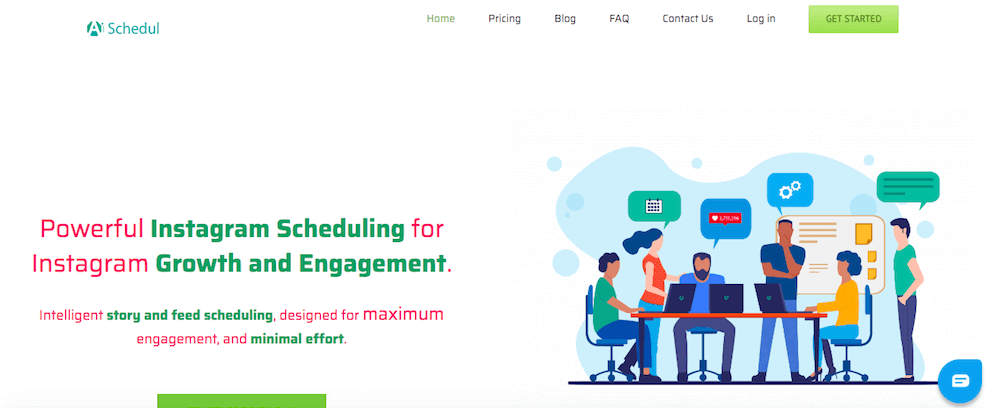
It is another free app that allows you to upload images on your Instagram. The app is capable of creating highly engaging and astonishing Instagram stories with minimum work.

Features of AiSchedul:

  • You can schedule many Insta posts and for days and Weeks to come.
  • It also features posting on multiple accounts with a common platform.
  • The name itself indicates the scheduler, you can schedule and repost your stories in an easy and effortless manner.
  • It also helps you to tag people, along with Geo-Tags support.
  • The tool is designed with an advanced feature of Hashtag that searches hashtags, it can be used to engage yourself with others.
  • Lastly, It also supports automated replies to the comments on your Instagram account.

AiShedul is replete with features that altar Gramblr, so it is another handpicked choice by us.

Website to access this app: aischedul.com

9. Ramme
It is another top-notch Gramblr alternative, this lightweight app is beneficial for those people who do not want to compromise the quality of the image.

Features of Ramme:

  • It is an ideal choice for influencers who can’t afford to compromise the image quality
  • Ramme is replete with features that serve multiple purposes including upload images, creating Insta stories, sending direct messages, and so on.
  • It is a user-friendly tool that makes it easy to use.
  • The tool is not heavy, so you cannot be disturbed by using this Gramblr alternative for windows.
  • It is the matter of seconds to upload images by using it, just simply click on the “-” sign and start using it.

Download from this URL: https://www.softpedia.com/get/Internet/Other-Internet-Related/Ramme.shtml

10. Deskgram
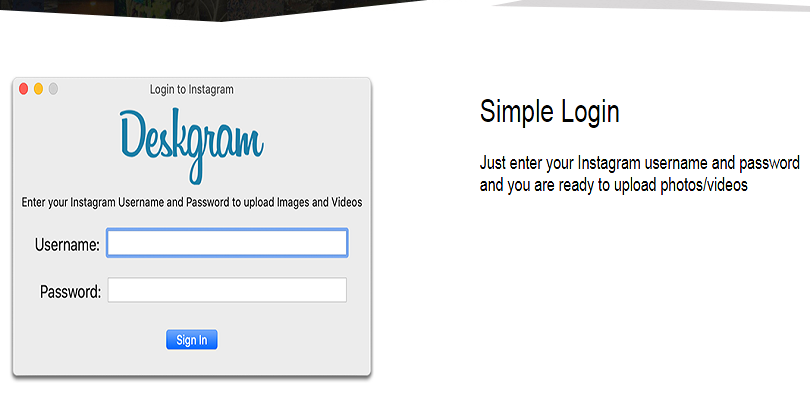
Deskgram is another growing app that can allow you to upload videos as well as photos from computer and Mac operating systems.

Features of Deskgram

  • You can promote your brand by uploading high quality photos
  • There is no installation require to use it
  • Drag and drop feature to make it easy to use
  • Hash tag feature to use in your posts
  • Simple login interface that needs your username and password and you are good

Access Deskgram: Deskgram.co

11. Windows Instagram App
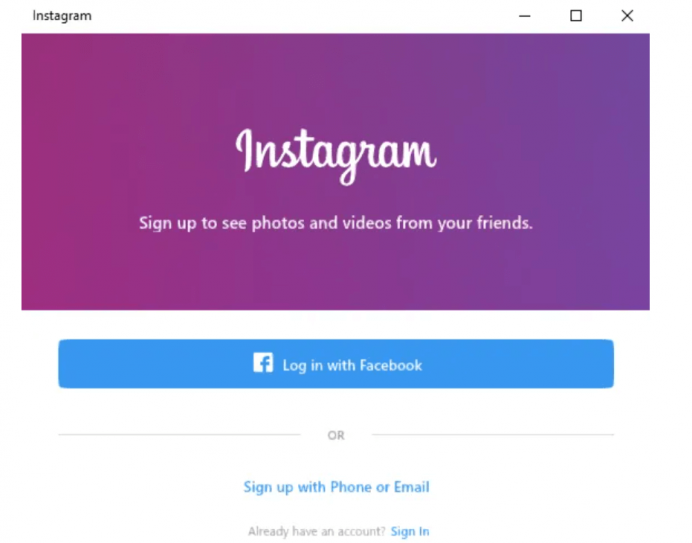
If you are using Windows 10, there is a great chance that you are due to updates, you can access this Gramblr like tool. Microsoft store allows you to download free of cost from its store and it is also lightweight.

Features Of Windows Instagram App:

  • Windows Instagram application gives you access to your messages directly, you can also view recent likes
  • Adding images to your Instagram account is child’s play for you, directly from your PC, you can upload it. Just right-click on the App icon and choose the New Post option to upload.
  • You can use desktop camera to get a picture or from photo gallery to upload the picture

12. BlueStacks
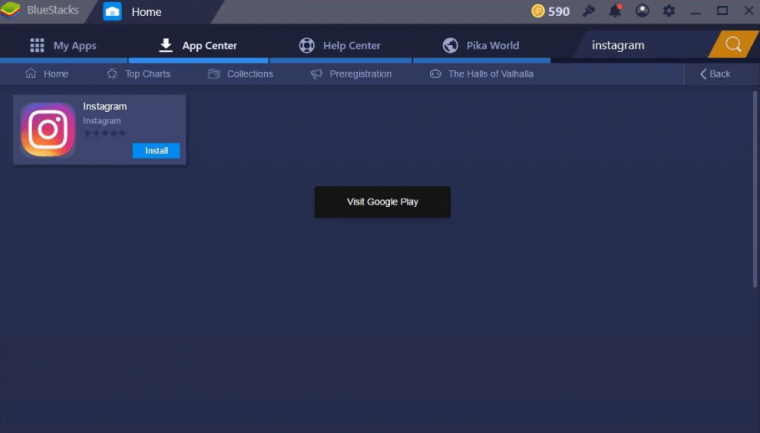
Do you use Bluestacks on your PC or Windows? If yes, it can also be used to promote your Instagram posts. It is compatible with Mac and PC/Laptop, you can download it free of cost. Sign up to create an account and start using your Instagram account without any inconvenience.

Final Words

I hope that I have listed all the Gramblr alternatives to date. Gramblr is not working, it may be possible that they have shut it down. So this is a list where you can find sites like Gramblr to post Instagram stories on PC. If you are having Gramblr 404 not found error, then you can use these tools.

If you liked the post, do not forget to share it with others.

Further Reading

How to Find People On Instagram

Tips to See Private Instagram Without Following

Tricks to Create Unlimited Instagram Accounts

Arsalan Rauf
Arsalan Rauf

Arsalan Rauf is an entrepreneur, freelancer, creative writer, and also a fountainhead of Green Hat Expert. Additionally, he is also an eminent researcher of Blogging, SEO, Internet Marketing, Social Media, premium accounts, codes, links, tips and tricks, etc.
www.greenhatexpert.com

Filed Under: Instagram, Social Media

How to Watch Blocked YouTube Videos 2025

Last Updated on December 31, 2024 By Arsalan Rauf

YouTube belongs to Google and has become the second biggest search engine online. It can be used for content creation as well as for sharing content. YouTube is free of cost however, everyone cannot access to it. The most significant restrictions can be seen in countries like Vietnam, China and other middle east countries.

These geo-restrictions put limitation on access to YouTube, it means YouTube block videos in these locations. Do not worry, there are a number of ways to get over this issue and this guide will help you to know how to watch blocked YouTube videos.

Why are YouTube Videos Blocked?

There are a number of reasons that can result in blocked YouTube videos.

Restrictions on Broadcasting: It means that the video owner blocked the video in your region.

Your Network has blocked YouTube: It happens in administrations of school or work where they block YouTube or blacklist it.

Technical issues: Your computer/laptop is having troubles to play the video.

National censorship: It happens when the government does not want anyone to see another country’s content or videos on YouTube app or website.

How to Unblock Youtube Videos

These tricks will help you to enable YouTube access everywhere regardless of the restrictions. It allows you to watch premium videos without any additional effort, these methods are tried and tested that is why we have published them.

After doing a lot of research, we have got the solution. Follow the instructions to get started:

1: Edit the links

It is one of the easiest ways to see blocked YouTube videos, many people can unlock the videos with the help of this trick. Try this to unlock the video, the blocked video will be open. You need to make the slightest change in the URL of the video to watch it.

  • The first step is to find the video you want to see and visit the official website and copy the link of that video.
  • The next step is to edit the link and make some changes to it, for example at the end of every URL after YouTube domain www.YouTube.com/watch?v=abcdefgh, so you need to change it with www.youtube.com/v/abcdefgh

It will be helpful and it will help you to watch most of blocked YouTube videos. At times, it may show errors too.

2: Use HookTube

It is another famous site that gives access to YouTube videos in lite version, you can watch YouTube videos on this platform. It unblocks the videos in a simple manner.

It creates a mirror of the link of the video, so you need to make some changes to the URL using this method, use HookTube in the URL instead of YouTube.

Here is an example:

www.youtube.com/watch?=abcdefgh

www.hooktube.com/watch?=abcdefgh

The process is simple and easy so it will not waste your much time. it unblocks all the blocked YouTube videos.

How to Watch Blocked YouTube Videos in Your Country

1: Use a Proxy

A proxy is a server that works as a mediators between the internet and your PC/Laptop. This process will make the process from their servers and it shows that the content is being seen from that particular location.

YouTube tracks the IPS of its visitors and proxy will help you to change the location and you will be able to access the videos blocked in your region.

We also have a list of updated free proxy servers, they will help you to bypass the geo restrictions. There are a number of proxies you can find there and watch restricted videos in your country.

Use the preferred location for the video you want to watch on YouTube.

2: Virtual Private Networks

It is another method to watch blocked YouTube videos in your country, it will help you to hide your location and you can do it by different extensions.

Speaking of extensions, Google Chrome is replete with VPN extensions and we have listed the best VPNs in this list.

The list is replete with virtual private network extensions so you can access the blocked content.

3: Smart DNS

Smart DNS proxy will help you to get different proxy servers to unblock YouTube videos. It does not have any encryption and the servers are also faster than other networks.

SmartDNS technology has the ability to uplift the restrictions from such companies that is why people give preference to it.

4: Download YouTube Videos

If the above discussed options are not working for you, there is another option of downloading the video in order to avoid restrictions on YouTube videos and save the video on your PC.

For instance:

You have a URL www.youtube.com/watch?=abcdefgh

Change the URL to www.ssyoutube.com/watch?=abcdefgh

And it will redirect it to another site where you can download the video and it also enables you to choose the quality of your choice.

How to Watch Blocked YouTube Videos in School

If your school or workplace has blocked certain YouTube videos, the best tip for you is to use a virtual private network (VPN) to access the content.

We have written this guide on best VPNs to access blocked YouTube videos.

Unblock Using Google Translate

If the VPN is failed to unblock the videos, you can still unblock YouTube videos at school or at your office with the help of this method.

The administrator of the network come up with the list of blocked sites for students and office goers and YouTube is one of them. However, Google translate is never blocked due to its benefits for students and offices and you can use it to bypass the blocking experience.

You need to search the video in another language using this method, if you only have a single native language and do not know any other language. Then use this feature to translate your search into a different language such as French, Indian and German etc.

When you will search for anything other than your native language, Google will show you the foreign language results. after doing so, select the site and open it in your own language by clicking the translate this page.

As a result, it will load the link using Google Translate and will bypass YouTube block by school or administration. This way, you can watch the videos without using a VPN.

That’s it guys, here is another helpful guide to access age-restricted videos on YouTube. I hope that you have liked this post and you will be able to access blocked YouTube videos. Share it with others.

Further Reading

How to Bypass Age Restrictions on YouTube Videos

How to Download Private Videos from Vimeo

How to Download Private YouTube Videos

Arsalan Rauf
Arsalan Rauf

Arsalan Rauf is an entrepreneur, freelancer, creative writer, and also a fountainhead of Green Hat Expert. Additionally, he is also an eminent researcher of Blogging, SEO, Internet Marketing, Social Media, premium accounts, codes, links, tips and tricks, etc.
www.greenhatexpert.com

Filed Under: Social Media, YouTube Tagged With: how to watch blocked youtube videos in your country reddit, how to watch videos on youtube that are blocked

How to See a Private Instagram Without Following Them 2025

Last Updated on December 25, 2024 By Arsalan Rauf

How to View Instagram Photos Without Following or Private in 2025

Instagram is another social media that is also famous among people. This is a type of social media that is simple and easy to use like other social media networks and the demand for Instagram is also increasing. In this tutorial, you will learn how to see a private Instagram without following it. It will enable you to view the photos of Instagram which are private or locked in any account and you can do it without following them.

Related Read: Best Private Instagram Viewers

Instagram Without Following

Nowadays, people are consuming their time using social media, they add their photos and share with friends and relatives including on Facebook (create multiple Facebook accounts) and Twitter(Twitter unfollow tool). If we compare Instagram to Facebook and Twitter, it has its own merits. So Instagram has a feature to maintain your privacy so no one can neither steal your content or can misuse it.

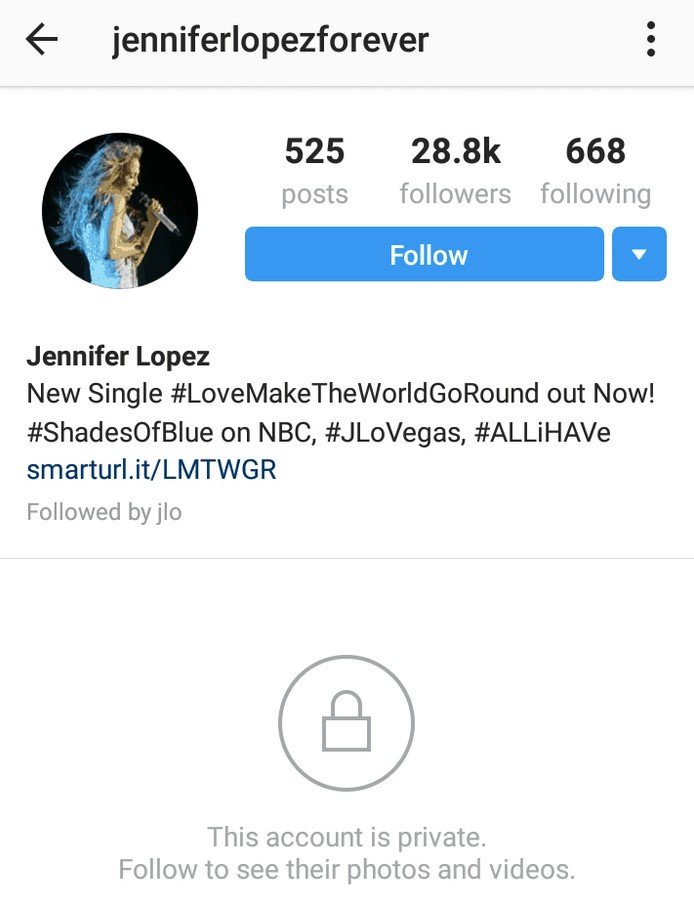
There are some people who want to spy on their friends, relatives, crushes, boyfriend, girlfriends and their ex. You may be one of them. So the problem is, if you want to see the private content what will you do? How to view Instagram photos private account without following?

It may attract your attention because there are many people around you want to do this. So do not worry we are going to give you a solution to see Instagram private account without following it.

Also, read our article about

  • Create Many Gmail Accounts without Phone Number

How to See a Private Instagram Photos Without Following Locked or Private account

  1. The first step is to create a new Instagram account

You can create a new account to follow them. If you want to follow a man, you need a profile of women to follow it. When the profile is of woman, you need to create an account of man.

  1. Using the application

Use applications like

  • copygram
  • ekstragram
  • PrivateInsta

You need to visit it with a simple look and after doing so enter your Instagram username and enter the submit button. Wait for other applications to open and you can view all the content of private Instagram. Some of them are third party applications so they will help you to see the private Instagram without following.

  1. Encourage these users to make friends

You need to contact it or follow it. There are a number of contacts which are available with their biography or Whatsapp number and so on.

Also, read our article about

  • Create Whatsapp account without phone number

So it is another step to see a private Instagram without following it so try it. In addition, if you are looking for an alternative method, do not worry here it is.

Method 2#

  1. Go to This Site http://ppdcrown.net/
  2. Click The button  ”Click Here & Access It Now”
  3. Enter ”Instagram Profile Name ex. Arsalan Rauf and Click The button ”View Profile”
  4. Wait until the program is Finish
  5. Enjoy To View Any private Instagram profiles
Arsalan Rauf
Arsalan Rauf

Arsalan Rauf is an entrepreneur, freelancer, creative writer, and also a fountainhead of Green Hat Expert. Additionally, he is also an eminent researcher of Blogging, SEO, Internet Marketing, Social Media, premium accounts, codes, links, tips and tricks, etc.
www.greenhatexpert.com

Filed Under: Instagram, Social Media Tagged With: How to See a Private Instagram Without Following, how to view someones private instagram photos, insta private -viewer, instagram profile viewer tools, is there a way to view private instagram, ppdcrown. net, private instagram viewer reddit, view private instagram without human verification, view private instagram without survey

What is the AI trend on Instagram?

Last Updated on January 2, 2023 By Arsalan Rauf

The AI Avatar trend has become viral on Instagram, Twitter, TikTok, and other social media sites and apps.

On Instagram, the trend is being used by many celebrities, bodybuilders, and influencers.

Basically, they are turning their many pictures into AI-generated art.

The generated art seems to be photorealistic and gives an accurate representation of yourself.

Unlike other AI, Lensa AI will focus on your facial features, skin tone and hair.

In this article, I will tell you what is the AI trend on Instagram and what is the app to generate AI photos, selfies, and art.

What is the AI trend on Instagram?

The AI trend on Instagram is the trend in which users make AI versions of themselves and post them as a carousel.

Usually, the avatar is similar to your skin tone, hair and facial elements.

You can generate avatars of yourself with the help of different AI tech.

Currently, Lensa AI has become the most popular AI in the market.

Celebrities, influencers, and bodybuilders are also participating in this trend.

You can generate hundreds of avatars of yourself by using this AI.

The avatars created by it are vibrant, unique, and other-worldly.

However, you cannot generate these avatars free of cost—it charges $3.99 for 50 images.

If you’re a subscriber, 50% off for each plan will be offered to you.

What is the AI app everyone is using on Instagram?

Lensa AI is the app that is being used on IG and other apps are Avatar, Photo Editor by Prisma labs, inc.

Currently, it is ranked at the #1 for “Photo & Video” on the App Store and Google Play Store in different countries.

  1. Go to the App Store or Google Play Store.
  2. Search for the terms “Lensa AI” and download it.
  3. Go to the Lensa AI app and open it and agree to the privacy policy.
  4. Keep tapping on “Next” until it takes you to the free trial page.
  5. Enable “Free trial” and tap on “Try free & Subscribe”.

You will get a free trial of 7 days by enabling the free trial.

However, you will have to pay for the Magic Avatars feature.

Having said that, subscribers will get 50% off on the Magic Avatars feature.

You have to cancel your subscription before 7 days or you’ll be get charged and for a full year.

To cancel the free trial on Apple, visit the Settings app > Your name > Subscriptions > Lensa AI Cancel Free Trial.

On Android devices, go to Google Play > Subscriptions > Lensa AI > cancel the subscription.

How to do the AI trend on Instagram

To do the AI trend on Instagram, you need to download the Lensa AI app from the Google play store or App Store, access it, and select “Magic Avatars”.

After selecting it, select 10-20 photos of yourself and select “Add”.

After that, choose your gender and select the number of avatars you want to generate such as 50, 100, or 200.

In the end, you have to check out and pay (whether you’re a subscriber or you are using the free trial, you’ll get 50% off).

The best practice is to post the generated avatars on Instagram as a carousel (if posting multiple photos).

1. Use the Magic Avatars feature and select more than 10 photos

  1. Go to the Lensa AI app and open it, and select “Magic Avatars”.
  2. Agree to the terms that you are of the age of majority (18+ years old).
  3. Select 10 to 20 photos of yourself and select “Add”.

You need to ensure that you add close-up selfies of the same person.

Choose photos of facial expressions, different backgrounds, head tilts, and expressions.

Refrain from using group shots, covered faces, or animals.

2. Choose your gender and check out

  1. Choose your gender (e.g., Male or Female).
  2. Choose a plan (for instance, 50, 100, 200 avatars).
  3. Tap on the purchase button in order to check out (subscribers receive 50% off).

Unfortunately, the Magic Avatars feature is not free even if you’re a subscriber or using a trial.

Therefore, do not pay for it unless you really need it.

If you’ve mistakenly or accidentally purchased the feature, you can request for a refund from Apple or Google Play support.

What’s Next

How to Make an AI Avatar of Yourself

How to Get Lensa AI

What is the AI Trend on TikTok

Arsalan Rauf
Arsalan Rauf

Arsalan Rauf is an entrepreneur, freelancer, creative writer, and also a fountainhead of Green Hat Expert. Additionally, he is also an eminent researcher of Blogging, SEO, Internet Marketing, Social Media, premium accounts, codes, links, tips and tricks, etc.
www.greenhatexpert.com

Filed Under: Instagram, Social Media

How to Poke Someone on Facebook in 2024

Last Updated on December 30, 2023 By Arsalan Rauf

If you are curious to know whether poking is still a feature on Facebook, you are at the right place.

Poking used to be a really cool thing that is added by Facebook in the early days.

People tend to use it to nudge their friends and family.

For instance, if someone is not coming on Facebook for a while, you can use this feature to poke them.

The user will be notified through a notification by email whenever you poke a user on Facebook.

In this post, I am going to teach you how to poke someone on Facebook with mobile app.

You will also come to know what is poking and whether it is flirting or not.

What is poking on Facebook?

Poking is a unique feature developed by Facebook to enable you to send a “Poke” notification to users.

If you have not talked to your class mate for a while, you can always poke them to break the ice.

The feature can be used in different ways on the platform.

It can be used to greet someone on FB.

Further, you can poke anyone to see whether the user will poke you back or not.

If they poke back, you can use the feature in future to poke them again.

However, the feature can be used again if the person pokes you back first.

If you want to avoid poking, you can ignore the user or in worse case, you can block them too.

How to poke someone on Facebook 2024

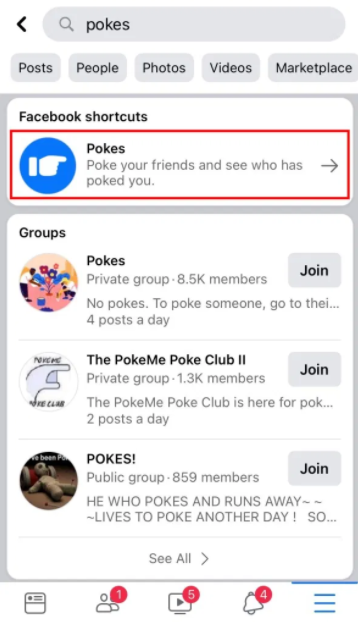
Search for “Poke” using the search feature on Facebook to poke someone on Facebook.

Reach the shortcut of “pokes” and tap on it to poke someone.

When you poke someone, the user will be notified that you have poked them.

The user will get the notification through Facebook notification or by email.

The feature is still available.

However, it is not visible so you have to search for it because it is hidden on Facebook.

When you navigate to the pokes page, you will see the list of your Facebook friends that have already poked you.

Furthermore, you can also see a list of suggested pokes too.

I have written a step by step guide on how to poke someone on Facebook.

1. Tap on the search icon

Open Facebook app> tap the search icon available on the top right side.

First of all, open the Facebook app on your android device.

The desktop version can also be used on PC to visit the pokes page.

However, we have taken the screenshots from an android device, so the user interface may be different from the desktop version.

The first step is to open Facebook app and navigate to any page.

The search icon will be visible on the top navigation bar.

You need to search for pokes page to find it.

It is because the feature is hidden from the menu of Facebook.

To use the search feature on Facebook, tap on the search icon.

The search feature will enable you to search for people, posts, shortcuts, and so on.

The poke feature is characterized as “Facebook shortcuts”, so you can use the search feature to find it.

Move on to the next step to know how to navigate to the poke function on Facebook.

2. Search for “Poke” and tap on “Pokes”

Use search icon> search for “Poke”> tap on “Pokes” under “Facebook shortcuts”.

After tapping on the search icon, the search feature will be opened.

The search bar will also display your recent searches as well.

On the search bar, type “Pokes” to search.

After typing the term, tap on “Search” to search the poke feature.

After searching for “Pokes”, Facebook will display “Facebook shortcuts” header.

Under the header, you will come across a shortcut named “Pokes”.

This is the shortcut you need to start using the function.

To go to the poke function, tap on “Pokes”.

Proceed to the next and final step to learn how to poke your friends on Facebook in 2024.

3. Tap on “Poke” to poke anyone

Search the friend to poke them, search the friend you want to poke and tap on “Poke” button visible next to their name.

After tapping on the “Pokes” feature, you will be redirected to pokes page.

Further, it will also display the list of friends who have poked you on Facebook under “Pokes”.

In addition, you will also see a list of friends under “Suggested Pokes” to poke them.

The suggestion depends on the algorithm of Facebook.

Tap on the “Poke” button next to their name if you want to poke someone.

The poke notification will be sent to them using app or email after you have poked them.

Then, it is their choice whether they reciprocate the poke or ignore the poke.

If they poked you back, then you can also poke them again.

However, if your friend ignored the poke, you will not be able to poke them for the next time.

You can poke any of your friends who have poked you listed under the “Pokes header.

Tapping the “Poke Back” button will do the job.

The “Poke Back” button will notify your friends with a notification that you have poked them back similar to the “Poke” button.

You have successfully learned how to poke someone on Facebook in mobile app or on PC.

Is poking on Facebook flirting?

Poking on Facebook is not necessarily considered flirting.

The function can be used to greet someone or to break the ice or a friendly nudge.

For instance, if someone is disappeared from Facebook for a long time, you can poke them to get them back to the app.

You can also use the feature to say hello in a non-intrusive way.

It all depends on the intention behind every poke.

Final Words

Poking on Facebook has been defamed in the past years.

Some users consider this feature creepy because they might get poked by users whom they do not know.

Other users find it unnecessary because it is just poking nothing else.

Poking can also cause confusion because you may not know what the person feels or thinks about you when they poke you.

Is it a greeting or something more than a greeting?

It depends on the receivers thinking to determine the cause of poking.

Arsalan Rauf
Arsalan Rauf

Arsalan Rauf is an entrepreneur, freelancer, creative writer, and also a fountainhead of Green Hat Expert. Additionally, he is also an eminent researcher of Blogging, SEO, Internet Marketing, Social Media, premium accounts, codes, links, tips and tricks, etc.

www.greenhatexpert.com

Filed Under: Facebook

How To Know Who Viewed Your Instagram Profile 2023

Last Updated on December 30, 2022 By Arsalan Rauf

If you post something interesting on Instagram then other people will like it. They will like your photos and can even follow your Instagram account as well. at times, on Instagram, people become ‘kepo’. If you are a girl or lady and you upload your photos like selfie. A number of guys who liked the photo will want to know who viewed your Instagram profile online (Instagram Visitors Profile.

Everyone may wonder, who is the person who likes you or your photos on Instagram? Do you know that there is a who viewed my Instagram app which you can use to find out who like ‘kepo’ to your instagram account?

Can I View Who Views My Instagram Pictures?

Yes, now Who Viewed my Instagram app is available for this task. You need to download Who Viewed my Instagram profile Apk to know who viewed your Instagram profile. And you can do this by downloading Who Viewed my Instagram app free online. The creator of the app is Mobile arts Digital LTD. This application will let you know who views your instagram story or pictures. Here is how to use it:

Also, read

How to See a Private Instagram without following

Know Who Viewed Your Instagram Profile:

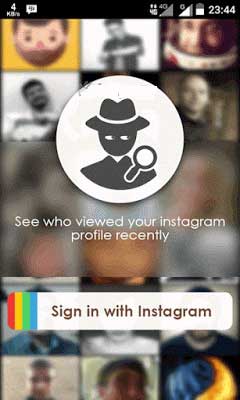
1: First of all, download and install an application called Who Viewed in my Instagram Play Store.

2: Open the application, and click Sign In With Instagram.

Sign In With Instagram

3: Set as authorized these apps to access your Instagram account.

4: If so, then your Instagram account will appear.

Your Instagram Account

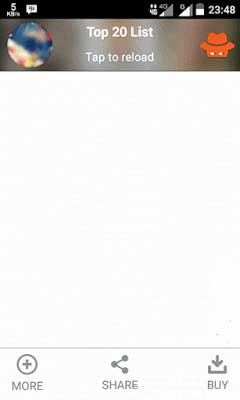
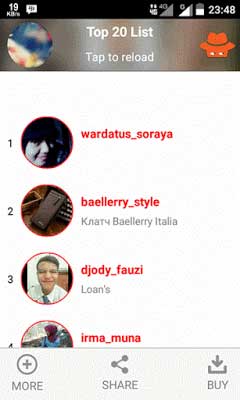
5: To see who’s saw your Instagram profile, tap to reload so you can see the people who see

your Instagram profile

By using this application, you will find out the people who often see your Instagram profile. If you use the free version, it will only display 5 people who viewed your profile. If you want to get access to the premium version of the app, you have to buy the premium version.

There are a number of Android Apps to See Who Viewed My Instagram

There are a number of ways to find out about your Instagram stalkers for free.

1. Follower Analyzer for Instagram App

It is interesting that you can see who viewed your instagram profile, I know you may be looking for an answer to these questions:

  • How to see who viewed your Instagram video?
  • How to see who views your Instagram profile?
  • How to see who viewed your Instagram story?
  • How to see who viewed your Instagram post?
  • How to see who viewed your Instagram photos?

This application “Follower Analyzer for Instagram” is the ideal app to consider when it comes to dealing with stalkers and iOS users can also download it from apple store. Registering the account will start the process and it will start analyzing your instagram profile as well as stalkers.

https://play.google.com/store/apps/details?id=com.maximolab.followeranalyzer

2. Follower Insight for Instagram

This is the first application in the list to find out the answer to this question, it enables you to track the followers, the people who unfollowed you and block you on this social network. It sends a notification for each activity on your profile.

The interface of this application is user friendly and it has the ability to inform the stalkers of your profile.

https://play.google.com/store/apps/details?id=com.yy.adam.insight&hl=en&gl=US

3: Views For Instagram Application

This is another useful app to know who viewed your instagram profile for free. This application allows you to get the list of your stalker instantly whoever stalks your profile or story you share on your profile, it can detect them.

This Views for Instagram app is an answer to your question that can I see who views my Instagram pictures. If you are thinking about its interface, don’t worry it is simple and easy to use and it will give you the report with ease. It is free of cost, therefore, the signing up process is also free for this app.

https://play.google.com/store/apps/details?id=com.richard.viewsforinsta&hl=en

4: PluStalker – Who Viewed Your Instagram Profile app?

How to see who views my Instagram profile or who viewed my instagram story or who viewed my instagram photos? When you come across these questions, this Who Viewed your instagram profile app is the solution for it. 

This instagram analysis app allows you to know that who is following you secretly on Instagram

https://play.google.com/store/apps/details?id=com.analyzer.plustalker&hl=en&gl=US

5: InMyStalker – Who Viewed My Profile Instagram

It is the most recent application that is becoming popular among the masses, it has more than 19,000 reviews on Play store with 4.4 stars out of 5 stars.

The main features of this app:

  • Allows you to track your profile visitors
  • Find out the stalkers
  • Find your secret admirer

https://play.google.com/store/apps/details?id=com.mystalker.profile&hl=en&gl=US

6: Who Viewed My IG Insta Profile Application

Using Who Viewed My IG Insta application, you can get the regular reports of people who are stalking your Instagram and showing interest in your posts as well as stories. The best thing is you get to know who viewed your Instagram posts for free. In addition, the app gives you notifications on your android device and their engagement on your posts too.

The interface of this application is fast and easy to operate so it is not complicated at all, even a person who is using it for the first time can use it. it is one of the best apps to know who viewed your Instagram.

Note: This application is deleted by Google Play Store but we have a solution, here is a list of sites that can provide you this application in APK format.

7. Followers Insight for Instagram, Tracker, Analyzer App

This application is also made to check who viewed my Instagram profile, it is a free app that sends a push notification when someone stalks your profile whether it is a video, post or story.

The main features of this app:

  • It detects who likes, comments you most
  • The location analysis of the post
  • People who unfollow you
  • Your lost followers

https://play.google.com/store/apps/details?id=com.yy.adam.insight

8. Insights for Instagram ✔Ghosts ✔Followers ✔Stories

Do you want to see who views your Instagram story? If yes, this application can give you the answer.

There are a number of users who give preference to this application due to its accuracy. It is highly suggested if you want to track the visitors of your profiles or account.

https://play.google.com/store/apps/details?id=io.karn.insights

This app does not work now.

I hope that you have liked the post on how to know who viewed your Instagram profile.

Do not forget to share this post.

What’s Next

Can you see who views your tiktok profile

Arsalan Rauf
Arsalan Rauf

Arsalan Rauf is an entrepreneur, freelancer, creative writer, and also a fountainhead of Green Hat Expert. Additionally, he is also an eminent researcher of Blogging, SEO, Internet Marketing, Social Media, premium accounts, codes, links, tips and tricks, etc.
www.greenhatexpert.com

Filed Under: Instagram, Social Media Tagged With: can i see who views my instagram pictures, who viewed my instagram app, who viewed my instagram free online, who viewed my instagram online, who viewed my instagram profile apk, who viewed my instagram profile free, who viewed my instagram profile online, who viewed my instagram video

10 Best Ways To Promote YouTube Videos in 2026

Last Updated on December 23, 2025 By Arsalan Rauf

Do you have a YouTube Channel & publish videos on regular basis?

It does not matter how much time you spend while making your videos; if you are not promoting them or marketing your videos, your precious work will never be seen by the majority of the viewers.

YouTube video promotion is an art that you can learn and it needs a little discipline.

In this post, I am sharing techniques and strategies that you can follow to promote your YouTube videos.

The tips are tested, proven and work for every niche videos so it does not matter what your niche is. Bookmark this post and use it as a checklist which you need to follow once you have created your videos.

So without further waiting, let’s learn the art of YouTube video promotion.

How To Promote A YouTube Video & Get More Views

I have added all the major promotion techniques in the sub-topics below.

Note: In upcoming posts in Green Hat Expert’s YouTube promotion series, I shall explain the sub-topics in detail. If you are already a professional YouTuber or planning to become one, you should like our Facebook page for latest updates.

1: Video Title

The titles of your videos are a major factor between them shared across the web and being widely seen or only getting a small number of views.

It is the best idea to do proper keyword research to find what people are searching for or trends of the keywords and create a great title after that.

YouTube Auto suggest for great titles

Here are some pro tips for writing attracting video titles on YouTube:

  • Keep them short (precise) and to the point.
  • Use “Power Words” (Ex: Best, Awesome, Incredible).
  • Add the current year if there is a space (Ex: Best Tips for 2018-2019).
  • Make it attention grabbing.
  • Include keywords at the beginning of the title (where possible).
  • Use emotional words (Ex: Sensual, Lonely, Passionate, Censored).
  • Capitalize your headline title. Use this tool, it will help you.

2: Video Tags

The use of incorrect tag is one of the biggest mistakes that make the growth of your YouTube video’ organic promotion difficult.

Tags in YouTube videos works in a different manner as compared with blog posts. If you are not paying attention to your YouTube tags then it is the right time to start it. in addition, you can also undo your old tags by editing them.

Here are some tips for using YouTube video tags:

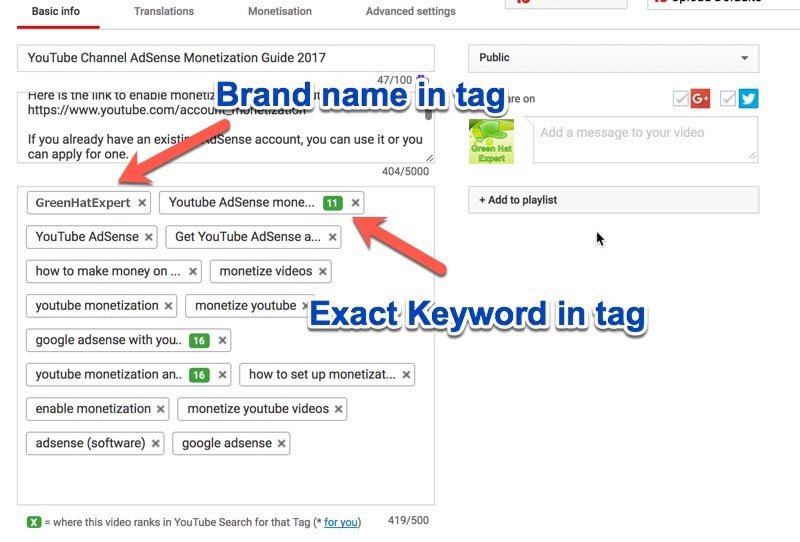
  • Use a unique branded tag so that your videos are displayed in related videos. Ex: Use your brand name in all videos like Green Hat Expert.(See below picture.)
  • Use your main keywords as the video tag.
  • Find the tags used by top ranking videos & use those in your videos. You can use the TubeBuddy Chrome extension that helps you to find tags used by other YouTubers.
  • Use a variation of your keyword as a tag (take help of the YouTube auto-suggest feature).
Youtube tags

You need to know that YouTube tags are an important organic ranking factor for your videos.

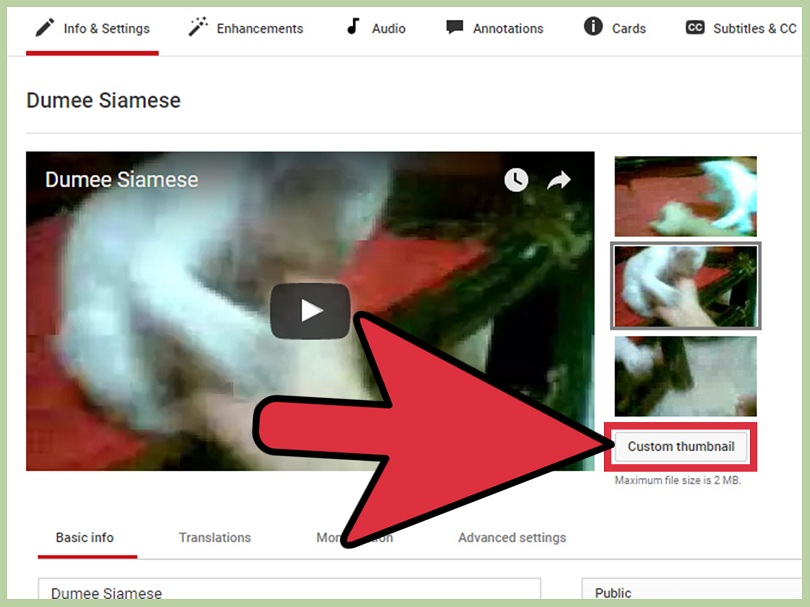
3: Use a Custom Thumbnail

If your YouTube channel is verified then you can get the advantage of the custom thumbnail feature. A good video thumbnail allows you to stand in the suggested and related videos section.

Here are some tips for thumbnails:

  • Make a resolution of 1280 x 720 (with a minimum width of 640 pixels).
  • Upload in either .JPG, .GIF, .BMP, or .PNG.
  • Try to use a 16:9 aspect ratio as it is the most used in YouTube players and previews.
  • Keep it under the size of 2MB.

I do not want to create a confusion by using these technicalities but you need to be aware of this to create a thumbnail that works efficiently on mobile as well as on desktop devices.

Make a Custom Thumbnail for YouTube

You can use Canva or YouZign to make a thumbnail for YouTube videos in couple of minutes.

4: Focus on Branding

There are a few branding things you need to do from now on to make sure every video stands out. Branded intro and outro are of those things.

  • YouTube intro: A 3-5 second clip that runs at the starting to pay attention to your brand.
  • YouTube outro: This runs at the end and can be as simple as showing related videos for your channel or asking users to like videos & subscribe to your channel.

Creating a YouTube intro and outro of a video is an easy task. You can create it with the help of Camtasia or you can order on Fiverr to get one.

If you do not have a channel logo, then you need to design one or hire someone on Fiverr to do it for you.

5: Share Videos on Social Media Channels

If you are a video blogger, then you should have social media community for your YouTube channel. It allows you to create a community outside of YouTube and you can get direct traffic from your social media channels.

Here are some of the social media channels that you must have:

  • Facebook page
  • Twitter profile
  • Google Plus page
  • Instagram profile
  • Pinterest profile

In addition, you can also use a tool that is, Buffer which has the ability to schedule your videos to be shared on social media. You can also benefit from IFTT + Buffer integration to share your newly published videos on your social media page automatically.

Read more:

  • How to watch 18+ Videos on YouTube

Pro tip: Always share your video after a regular interval

Usually, the famous bloggers share every video at least 10-15 times during 6 months duration after publishing it. In addition, also use hashtags while sharing to make them visible and it will be easy to discover.

6: Start a Website or Blog for Your YouTube Channel

If your full-time job is YouTube, then you should create a blog to promote your YouTube videos. Nowadays, it is an easy task to embed YouTube videos on your website and you can also make a blog on free or paid platform.

I suggest you to make a website using WordPress and install a video specific WP theme. It is wise to use Best Managed WordPress hosting so you do not have to worry about website maintenance.

In the meantime, you can use plugins like:

  • Yoast SEO WordPress plugin– to do perfect SEO for your site to rank higher.
  • YouTube Viral Subscribe plugin – to automatically add a “subscribe to channel” tag after every video.

Read more:

  • How to Add YouTube subscribe button in WordPress

If not WordPress, you can take advantage of other platforms like:

  • Medium
  • Tumblr
  • BlogSpot

Bonus tip: Purchase a domain name and you can redirect it to your YouTube Channel. When someone wants to find your YouTube channel, you can also provide him your domain name to reach you.

7: Create a Playlist or Add your Video to an Existing Playlist

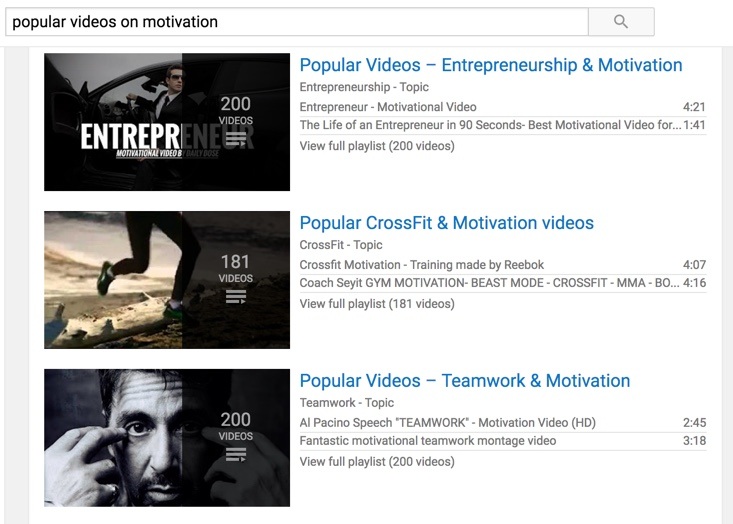
Create a playlist and get more views on your existing videos with ease. After uploading the new video, add it to a playlist (either create a new one or add it to an existing one).

If you are creating a new playlist, follow these steps:

  1. Give a meaningful name to the playlist & use a keyword in the title of that playlist.
  2. Add a description in detail for the playlist and add your keywords in there.
  3. Group similar videos into one playlist.
  4. A single video can be added to more than one playlist.

You can see the YouTube playlists in the search results of YouTube. If you will also do this, the discovery of your videos will be easy.

YouTube playlist

8: Use Calls to Action

You have to tell the people on social media websites what action you want them to take.

At the end of the video, or somewhere in the middle, ask viewers to like the video, leave the comment or subscribe to your channel. In the meantime, you can also ask them to share your content with friends so they can take advantage of it.

There are a number of famous YouTubers are using this technique to benefit from existing viewership. If you have not been doing this before, start doing it from the very next video. You will be delighted to see that by simply asking about the number of shares, it gets increase to a great extent.

9: Interview Influencers in Your Niche

This step is not a direct YouTube promotion technique but it helps you to improve your overall strategy of your channel promotion.

Interviewing an influencer provides you a chance to get access to already prosperous community in your niche. Not only you will get the attention of the viewers who follow that specific influencer, you will get focused on the industry as a whole.

You can find the top influencers in your niche and interview them with the help of Skype and Google Hangouts.

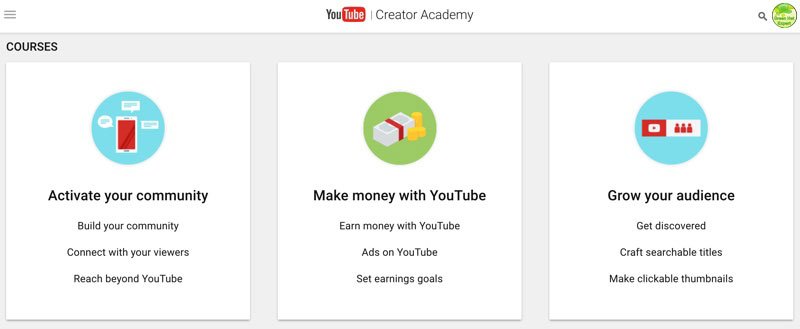
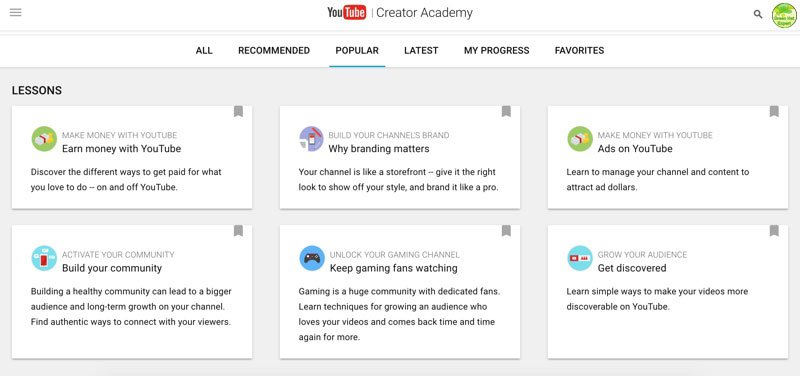
10: Spend time Learning at Creator Academy of YouTube

YouTube creator academy

People who work on YouTube and grow their channel, they stop learning and move their entire focus on publishing more videos. It is a common mistake among them.

If you are a YouTuber then it is necessary for you to learn about all emerging and existing tips and tricks to keep yourself up to date.

YouTube creator academy

You can use Creator Academy by YouTube to learn some professional tips for making the most out of your YouTube videos (and your channel as a whole).

Promote Your YouTube Videos And Get More Views

So, these were some simple promotion techniques and strategies which you can use from now on to promote your YouTube videos.

My tips and tricks will definitely help you to get more views, traffic and you will also get more subscribers.

Now it’s your turn to share your experience how do you promote videos on YouTube when you publish it.

I will update the post after getting suggestions from the comment section.

Do not forget to share this post.

Also, like our Facebook page for the latest posts and updates.

Arsalan Rauf
Arsalan Rauf

Arsalan Rauf is an entrepreneur, freelancer, creative writer, and also a fountainhead of Green Hat Expert. Additionally, he is also an eminent researcher of Blogging, SEO, Internet Marketing, Social Media, premium accounts, codes, links, tips and tricks, etc.
www.greenhatexpert.com

Filed Under: YouTube Tagged With: how to promote youtube videos free, how to promote youtube videos without paying, pay to promote youtube video, promote youtube channel here, promote youtube video adwords, promote youtube video cost, sites to promote youtube videos free, youtube channel promotion sites

How to Remove Community Guidelines Strike on Instagram

Last Updated on December 29, 2022 By Arsalan Rauf

Are you facing a “Something you sent in a chat went against our community guidelines” error on Instagram?

There will be a “See Community Guidelines” button under the error.

If you tap on the button, it will take you to the community guidelines page.

The option is not there to appeal and it will restrict you from sending messages.

In this article, I will tell you why Instagram said that you went against their guidelines and how to remove the community guidelines strike/problem.

Why does Instagram say that I went against their community guidelines?

Instagram says that you went against their guidelines due to the violation of one or more of their community guidelines done by you.

In some cases, the algorithm might block you accidentally and you will get a community guidelines violation.

Recently, Instagram’s made changes to the algorithm that and the latest algorithm can detect community guideline violations in messages.

Consequently, many users got blocked from sending messages even though they have not done anything bad.

Some of the users got their stories and posts removed even though the content is devoid of nudity and violence.

You can get the error message on both Instagram and Facebook Messenger.

Here are some of the complaints, “So I tried to reply to my wife on Messenger and I found out that I’m unable to send messages for 3 days”.

“I can’t message customers on my personal page or business pages”.

“The same thing happened to me when I was chatting with a buddy”.

Some of the users reported that they were restricted due to alleged exploitation.

It seems like Instagram team has to fix its algorithm to avoid the restrictions that it is imposing on people due to an error.

How to remove community guidelines strike on Instagram

To remove the community guidelines strike on Instagram, you can do two things, use Instagram on web or wait for 3 days.

Another account on IG can also be used to report a problem on the Instagram app.

Otherwise, the only way is to wait for Instagram to release a new update to update/fix the algorithm.

Currently, the algorithm is stopping people from sending messages by mistake even if they have not violated any guidelines.

Solution 1: Wait for 3 days

  • To start sending messages again, wait for 3 days.
  • In some cases, the waiting time may be more than 3 days to be unrestricted.
  • The community guidelines violation is temporary and the error will be gone eventually.
  • The status of your account can be checked by going to Profile > Menu > Settings > Account > Account status.

Solution 2: Use the web version of Instagram

  • If Instagram has stopped you from sending messages, you can try using the web Instagram to send messages.
  • Fix 1: Visit instagram.com from your PC, log in to your account, select “Messages”, and try sending a message.
  • Fix 2: Download Instagram from the Microsoft Store, use your details to log in to your account, and try sending a message.

Solution 3: Use another account

  • If you’re restricted from sending messages from one account, you can use an extra account to prevent it.
  • To switch accounts, visit your profile, tap on your username, and select the account that you want to use and switch to it.
  • If you don’t have another Instagram account, you can get one here, after that, tap on your username, and select “Add account”.

Solution 4: Report a problem

  1. Visit your Instagram profile and tap on the menu icon.
  2. Settings > Help > Report a Problem.
  3. Report a Problem > Include and Continue.
  4. Give the details of your problem and send the report.

Note: If you’ve enabled “Shake phone to report a problem”, go to a message, shake your phone, and report your issue there.

What’s Next

How to Fix “You Can’t Send Messages for 3 Days” on Instagram

How to Fix “Video can’t be posted” on Instagram

How to Make a Website Like Instagram

Arsalan Rauf
Arsalan Rauf

Arsalan Rauf is an entrepreneur, freelancer, creative writer, and also a fountainhead of Green Hat Expert. Additionally, he is also an eminent researcher of Blogging, SEO, Internet Marketing, Social Media, premium accounts, codes, links, tips and tricks, etc.
www.greenhatexpert.com

Filed Under: Instagram, Social Media

How To Download Whatsapp Status Videos and Pictures in 2025

Last Updated on November 23, 2024 By Arsalan Rauf

How To Download Whatsapp Status Videos and Pictures in 2025

WhatsApp Status is a new feature introduced by Whatsapp which allows you to upload videos and photos to your status. Then your contacts will be able to see it, instead of seeing text-based boring status message. This feature is now available on Android, Windows Smartphones, and iOS around the world. The new status feature of Whatsapp is entirely inspired from the Snapchat’s stories. The company has announced it this year. So download Whatsapp status pictures and videos.

Whatsapp is a free chat application that has a large number of downloads and it is ranked on 1st position in India which has become the top free application on Google play store.

Then how to download Whatsapp status videos and pictures from Whatsapp story of others? There are two ways of doing that, here is how to download Whatsapp videos on Whatsapp status story for Android users:

Also read:

  • How to Recover Deleted Images from Android
  • Know Who Blocked you on Whatsapp
  • How to Send Whatsapp message without saving their number

Method 1:  How to Download Whatsapp Status Videos and Pictures

  1. First of all, install file manager application like Root Explorer (no need root).

Download Root Explorer Android

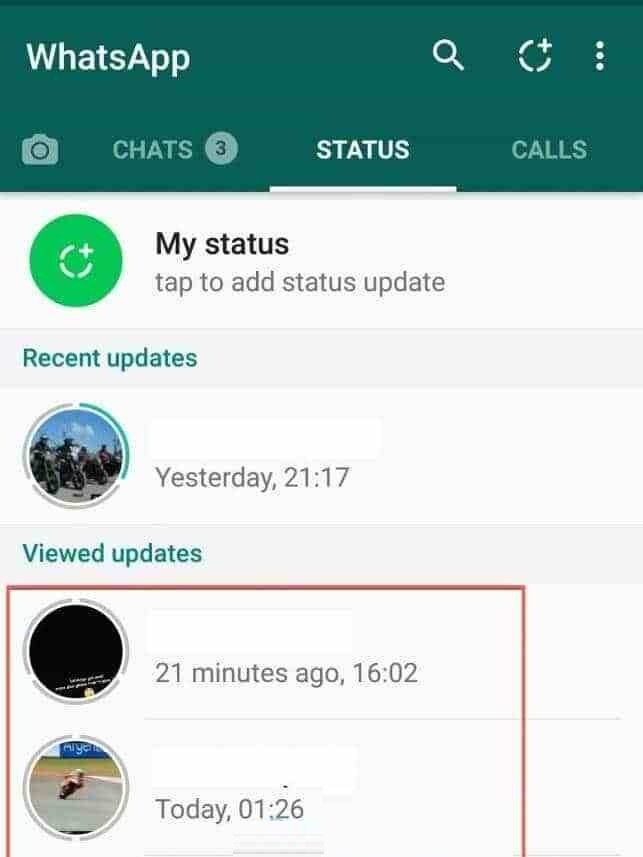
  1. Open WhatsApp app, Click and see the status videos which you want to download manually . (The task is that to download played whatsapp video which will be saved in cache memory of your smartphone or Android).

whatsapp-status-download-646x1024

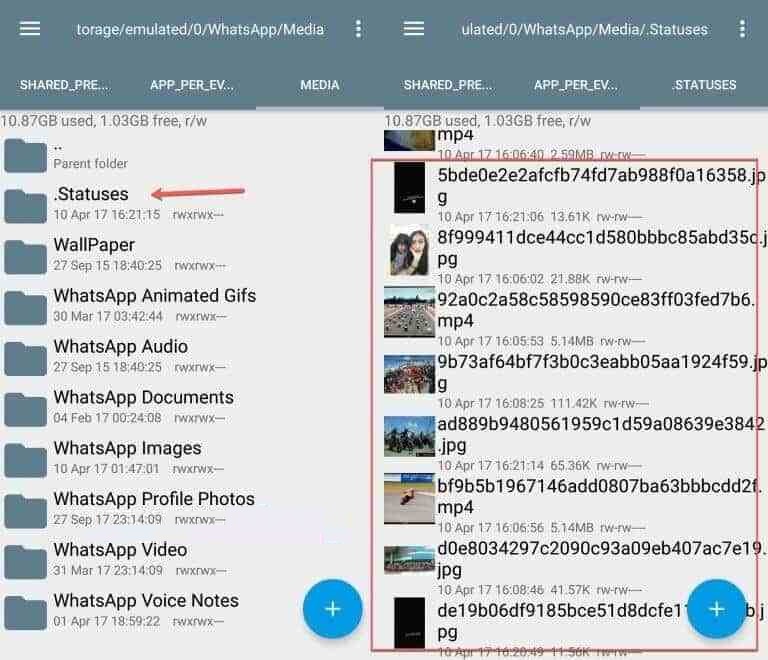
  1. Once you view the status of your contacts or friends video is watched then run Root Explorer, go to MemoryAndroid  /WhatsApp/Media/.Statuses/

Download-Whatsapp-Status-Video-and-Pictures1

  1. All videos or pictures you saw on the status of our companion story in the folder .Statuses, please copyor move them to the gallery folder you / DCIM / Camera /or / Download /

completed.

Method 2:  Download Whatsapp Status Video and Pictures with App

  1. Installapplications Story Saver for Whatzapp

https://play.google.com/store/apps/details?id=com.downlood.sav.whmedia&hl=en

  1. Now open WhatsApp app, Click and view the status video which you want to download manually . (The objective is to download played whatsapp video which will be stored in cache memory of your Smartphone).

whatsapp-status-download-646x1024

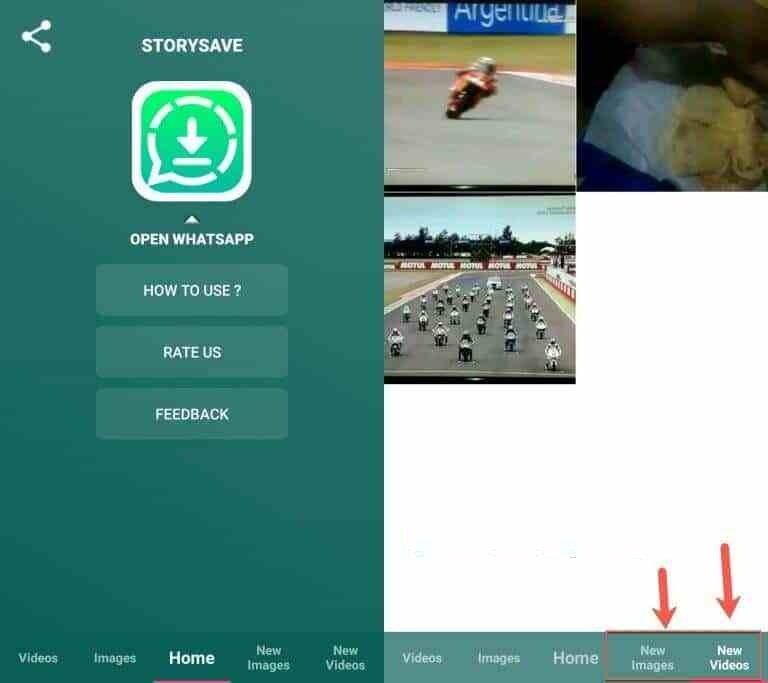
  1. Once you see or watch the status of your contacts or friends, then run the application Story Saver for Whatzapp
  2. Now visit the menu New Videoor New Imagesto download whatsapp Story Status of your friends.

Download-Whatsapp-Status-Video-and-Pictures

That is it. This is how to save whatsapp status of others. I hope that you liked the post on how to download Whatsapp status video or how to copy Whatsapp status videos of others.

Do not forget to share this post.

Arsalan Rauf
Arsalan Rauf

Arsalan Rauf is an entrepreneur, freelancer, creative writer, and also a fountainhead of Green Hat Expert. Additionally, he is also an eminent researcher of Blogging, SEO, Internet Marketing, Social Media, premium accounts, codes, links, tips and tricks, etc.
www.greenhatexpert.com

Filed Under: Social Media

Top 20 Trending TikTok Songs 2024

Last Updated on December 30, 2023 By Arsalan Rauf

Do you want to see the trending TikTok songs right now?

If you’re a creator, it is necessary for you to know what are the current trending songs on TikTok.

There is another benefit if you choose a trending song in your video, it will increase the chance of getting on the “For You” page.

Trending songs on TikTok keep changing with the passage of time.

Having said that, some of them might be popular for a long time.

In 2021, “I Love You So” (do not confuse it with “Love You So”) was popular for several weeks.

The release of the song was in 2014 by The Walters and it has become popular on TikTok.

This post has the top 20 popular and trending TikTok songs in 2024 right now and this week.

Note: I have retrieved the rankings in this list from TikTok’s Creative Center via “Trend Discovery”.

1. Love You So

It is a song by The King Khan and BBQ Show, a Canadian garage rock duo from Montreal, Quebec, Canada.

People confuse Love You So with “I Love You So” by The Walters, an American indie-pop band.

In 2022, Love You So went viral on TikTok and it has more than 8.7 million videos.

The most popular video using the song crossed more than 114 million views.

2. Monkeys Spinning Monkeys

The song Monkeys Spinning Monkeys is composed by Kevin MacLeod.

Kevin MacLeod is an American composer and musician who composed more than 2,000 copies of royalty-free music.

The genre of the song is comedy and people use it frequently in funny TikTok videos.

This song has crossed 26.6 million videos.

3. Just a Cloud Away

It is a song by Pharrell Williams.

He is an American singer, and rapper.

This soundtrack is taken from Despicable Me 2 from the original motion picture.

Most TikTok users use it with 2 captions in their content.

The first caption shows that they had low expectations of something and the second one is a twist from the first one.

4. Crazy

It is a song by Patsy Cline who is an American singer.

She was regarded as one of the most influential vocalists of the 20th century.

People use this song in videos of people who had a crazy relationship experience.

The video that has become the most popular video contains more than 26 million views.

5. Oh No

The song Oh No is sung by Kreepa, a musical artist.

The artist also claimed that he was just messing around in his basement with mixtape beats and used the “Oh No” voice.

The song is available in the videos of prank or mishap.

It has also become one of the most popular songs on TikTok that has been trending to this date.

This is a video about a dog getting angry when unable to eat a sausage.

6. Forever

Forever is a song by Labrinth who is a British singer, songwriter, rapper, record producer, and composer.

It was originally from the HBO series Euphoria.

The most popular video that is using that song, a drawing of a butterfly, flames, and a rose.

The video contains more than 83 million views and 13 million likes on TikTok.

7. Rocking A Cardigan in Atlanta

Rocking A Cardigan in Atlanta is sung by lil Shordie Scott.

The song accumulated more than 2 million views on YouTube and over 31 million plays on Spotify.

The most popular video which has the song is a dance of it.

The video contains more than 24 million views and 5 million likes.

8. Zou Bisou Bisou

It is a song by Gillian Hills, an English singer and actress. 

The song has become a meme on TikTok.

The first part of the meme contains a normal caption whereas the last part of the meme has a twist.

Here is an example of the meme, “your friend fails the test” next to “you copied”.

9. Miami, My Amy

Miami, My Amy is a song by Keith Whitley who is an American music singer, as well as a songwriter.

The song is based on a man who belongs to Los Angeles and meets a woman in Miami.

When he comes back to Los Angeles, the woman calls him and says that she misses him and invites him to return to Miami.

The most popular video using the song contains more than 17 million views and 3 million likes.

10. Spongebob Tomfoolery – Dante9k Remix

Spongebob Tomfoolery – Dante9k Remix is a song by David Snell.

He was a conductor, pianist, composer, and music director.

David Snell composed more than 170 pieces of music for shorts, series, and feature films.

People are using the song in funny TikTok videos of people and animals fooling around.

11. Tom’s Diner

Tom’s Diner is a song by Suzanne Vega who is an American singer-songwriter.

In 2019, the song was covered by AnnenMayKantereit x Giant Rooks.

The cover contains more than 37 million views on YouTube and was trending on TikTok in April, 2022.

The most popular video using Tom’s Diner is a cat sitting on a motorcycle with a helmet.

12. Sunroof

This is a song by Nicky Youre and dazy.

Sunroof premiered on YouTube on December 4th, 2021.

Since then, more than 2.8 million videos on TikTok used the song.

On Spotify, the song contains more than 42 million plays.

13. Something In The Way

Something in the Way is published by Nirvana, an American rock band.

The song became popular after “The Batman” movie featured it as a soundtrack.

TikTok users have used it in their videos to show how they felt after watching the movie.

The live video of the song contains more than 28 million views on YouTube.

14. Reading Rainbow Theme Song

Reading Rainbow Theme Song is an official theme song of Reading Rainbow.

The song teaches reading skills, habits, and attitudes.

The song was hosted by LeVar Burton for over 20 years.

The most popular video using Reading Rainbow contains more than 25 million views and 5.7 million likes.

15. Cmonnn (Hit It One Time)

 Cmonnn (Hit It One Time) is featured by Lay bandz and this song is by 5Star.

Currently, there are no confirmed lyrics available for this song on the web.

The song is used by more than 1.1 million songs on TikTok.

TikTok users mainly use this song in their videos while dancing to it.

16. Cornfield Chase

The official soundtrack of Intersteller is known as Cornfield Chase.

The soundtrack is produced by Hans Zimmer, a German film score composer as well as record producer.

It’s mainly used in TikTok videos that contain a memorable and amazing view.

The song is used in over 2.7 million videos on TikTok.

17. 556 (Green Tip)

556 (Green Tip) is featured by iayze, a musical artist.

556 Green Tip premiered on YouTube in February 2022.

The most popular video in which the song was used is by @Chirobackboard.com.

It displays a product that is used to crack your back.

18. Ginseng Strip 2002

Ginseng Strip 2002 is a song featured by Yung Lean and it was released in 2013.

However, it had become popular in 2021 and 2022 because of TikTok.

Yung Lean is a Swedish singer, rapper, as well as songwriter. 

Yung Lean is one of the most influential people in the early cloud rap era.

In short, Ginseng Strip 2002 is one of the most popular songs on TikTok (behind Lottery) that contains more than 12.8 million videos.

19. emo girl

The song, “emo girl” is produced by Machine Gun Kelly and WILLOW.

Emo Girl premiered on YouTube in February 2022.

Machine Gun Kelly is an American singer, rapper, musician, as well as actor.

Alternatively, WILLOW is an American singer and actress.

The song is used in TikTok videos having people and animals in their “Emo Phase”.

20. Cool for the Summer – Sped Up (Nightcore)

Cool for the Summer is a song featured by Demi Lovato.

This song was released in 2015.

Demi Lovato who produced it is an American singer, songwriter, and actress.

The song contains more than 395 million views on YouTube and a sped-up version of it was trending on TikTok in 2022.

@genboy3 posted a video of him dancing to the song that has more than 97 million views.

Final Words

If you’re a TikTok creator, it’s necessary to stay updated on trending songs on TikTok.

Using trending songs in your videos will give rise to your chances of getting on the “For You” page.

But your video should be of high quality and native to the app.

The list above has the top 20 popular and trending songs on TikTok in 2024.

You can get inspiration from browsing through the top videos of each song.

Just remember that the data is taken from TikTok’s Creative Center via “Trend Discovery”, therefore, the rankings are 100% accurate.

What’s Next

Top 10 Most Viewed TikTok Videos

How to Fix TikTok Effects Not Working

How to Get 1000 TikTok Followers Fast

Arsalan Rauf
Arsalan Rauf

Arsalan Rauf is an entrepreneur, freelancer, creative writer, and also a fountainhead of Green Hat Expert. Additionally, he is also an eminent researcher of Blogging, SEO, Internet Marketing, Social Media, premium accounts, codes, links, tips and tricks, etc.
www.greenhatexpert.com

Filed Under: Social Media, TikTok

  • « Previous Page
  • 1
  • …
  • 15
  • 16
  • 17
  • 18
  • 19
  • …
  • 37
  • Next Page »


Recent Posts

  • Free DeepSeek Accounts 2026
  • Free Zoho Mail Accounts 2026
  • Acudepot Discount Codes 2026
  • Free Blackshot Accounts 2026
  • Free GMX Email Accounts 2026
  • Songtrust Discount Codes 2026
  • Uzicases Discount Codes 2026
  • Cardillo Promo Codes 2026
  • Free DriverFix License Keys 2026
  • Avast Secureline VPN Activation Codes 2026

Recommended Posts

Create a Gmail Account Without Phone Number

Free Course Hero Account

Crunchyroll Accounts

Cracked Apps

Free Pokemon Go Accounts
Onlyfans Free Accounts
Free Chegg Accounts
Free Paypal Accounts
Free Gmail Accounts
Funny Steam Names

Categories

  • Apps
  • Apps for PC
  • Blogging
  • Discord
  • Facebook
  • Gaming
  • Grammar
  • Guide
  • How to
  • Instagram
  • Messaging
  • OnlyFans
  • Pinterest
  • Reddit
  • SEO
  • Snapchat
  • Social Media
  • Spotify
  • Steam
  • Telegram
  • TikTok
  • Twitch
  • Twitter
  • Whatsapp
  • WordPress
  • YouTube
  • Home
  • Social Media
  • Messaging
  • About
  • Submit Guest post