Green Hat Expert

  • Home
  • Social Media
    • Instagram
    • TikTok
    • Snapchat
    • Facebook
    • YouTube
    • Twitter
  • Messaging
    • Discord
    • Telegram
    • Whatsapp
  • About
  • Submit Guest post
You are here: Home / Archives for Social Media / TikTok

How to Recover Your TikTok Account Without Email or Phone

Last Updated on October 28, 2023 By Arsalan Rauf

Do you want to recover your TikTok account but you do not have access to your email and phone number?

If you have access to either your phone number or email, you can reset the password using the application.

You need to tap on “Forgot password?” option which is located on the login screen.

However, if you do not have access to your email or phone number, then you need to follow another method to restore your TikTok account.

As a last resort, you need to create a new TikTok account.

However, if you have a lot of followers or likes, you will recover the account at any cost.

In this post, I am going to teach you how to recover your TikTok account without email or phone number.

How to recover your TikTok account without email or phone number

You can submit the TikTok feedback form in order to recover your tiktok account without email or phone number.

On the other hand, you can also make a new account on TikTok and report the problem directly from the application.

After submitting the feedback form or reporting the problem, you need to wait for a few days to get the response from TikTok.

If your email or phone number is not accessible, you cannot reset your password.

To recover your account, the best way is to contact Tik Tok.

Apart from the feedback form, there is an alternative method which you can use to contact tik Tok.

You can contact them directly on the app.

However, you need to make a new account to contact them directly.

After making a new account, login to tik Tok, visit your profile, and tap on the three dots.

Scroll down to reach the option “Report a problem” and tap on it.

Now choose the relevant topic, tap on “No”, tap on “Still have problem”, illustrate your issue and tap on “Report” to report it.

Here is a step-by-step guide on how to use the tiktok feedback form to recover your account.

Step 1: Visit the TikTok feedback form

First of all, go to the feedback form of tik Tok.

The tiktok feedback has two advantages.

First of all, it enables you to share feedback and experience about the application.

Secondly, you can also report a problem that you are facing.

Then, the information you are going to give them will be used for response to your report.

You can go to the form using your mobile or desktop device.

First of all, you can search the term “TikTok feedback” on Google and visit the first search result.

On the other hand, you can also visit the feedback form by using this direct URL: https://www.tiktok.com/legal/report/feedback.

This is the official link of tik Tok feedback form.

Move on to the next step to learn what is the next step.

Step 2: Enter your email address and username

When you have opened the feedback form on tik Tok, you will come across a “Contact information” ahead.

There are two fields under the “Contact information”.

The first feed contains “Email address” field along with an asterisk.

Enter your email address under the “Email address” field.

You can enter any email address and it does not have to be associated with your tiktok account.

Since you do not have access to your old email address, you can use another email address that you have.

Additionally, you can also create a new one.

Under the “Username” field, you need to enter your tiktok username.

Although it is optional but in this case, you need to enter it because you are trying to recover your account.

Hence, it is imperative to enter the username of tiktok that you are going to recover.

Move on to the next step to learn how to submit the form completely.

Step 3: Explain that you lost your email and phone number

After putting your tiktok username and email account, scroll down the form.

You will come across “What would you like to tell us?” field in asterisk under the “Username” field.

It is imperative to inform them the problem you are going to report.

Since you want to get access or recover your account on tiktok, you need to explain that you do not have access to your phone number or email address.

Here is an example of description: “Hi TikTok team, I forgot my TikTok password and also I have lost access to my email and phone number. My TikTok username is @greenhatexpert. Can you help me to recover it?”.

There is an upload link available under the “What would you like to tell us?” field that allows you to upload attachments.

Since you are explaining that you have lost access to your email and phone number so it is not necessary to upload attachments.

Just simply submit the form to them.

To submit the form, tap on “Submit” button.

After submitting the form, you have to be patient and wait for 3-5 days to get the response from the team.

The response will be received to you through email that you have used while contacting them in email field.

So, follow the instructions you get in the response through email in order to recover your account.

How can I change my TikTok password without a phone number?

You can change the password of your TikTok without phone number with the help of your email address.

If you have lost the access to your mail too, then you need to contact TikTok directly via feedback form of TikTok to report the issue by yourself.

The feed back form on TikTok can be used to contact them directly the form URL is: https://www.tiktok.com/legal/report/feedback.

On the other hand, the issue can also be reported on the application by going to your profile > three dots … >report a problem > relevant topic > no > still have problem > describe your problem > report.

This is how it is done.

How do I get my old Tiktok account back without a password?

You need to log in using your mobile number in order to get your old account of TikTok back without a password.

It will send a 4-digit code to your phone number that you need to provide in order to access your account on TikTok.

On the other hand, password reset option is available on the login screen > Forgot password? > Phone number/Email.

By doing this, you will receive link to reset your password from TikTok.

Final Words

If you lose your account access on TikTok, you may be very disheartening.

You might have a good amount of videos on your account that you want to delete.

In addition, you may have a lot of followers on the account that you do not want to lose.

Either way, you need to follow the steps provided in this post in order to recover your TikTok account.

What’s Next

How to Fix “Too many attempts. Try again later” on TikTok

3 Ways to Contact TikTok

Can You Log into TikTok on Two Devices?

How to Get Your TikTok Profile URL

Arsalan Rauf
Arsalan Rauf

Arsalan Rauf is an entrepreneur, freelancer, creative writer, and also a fountainhead of Green Hat Expert. Additionally, he is also an eminent researcher of Blogging, SEO, Internet Marketing, Social Media, premium accounts, codes, links, tips and tricks, etc.
www.greenhatexpert.com

Filed Under: TikTok

How to Get Your TikTok Profile URL

Last Updated on September 2, 2022 By Arsalan Rauf

Do you want to share your TikTok profile URL with anyone?

If yes, you can send them your URL or tell them your username to share your profile.

The username process will need them to search for your username on TikTok.

However, if the username you are using is common, it will be hard to find your profile due to a lot of similar usernames.

In this case, you need to get your TikTok profile URL and send them by doing copy and paste.

The process will enable the users to visit your profile directly.

The only step they need to perform is to go to your profile using the URL.

In this article, I am going to teach you what is your TikTok URL, how to get TikTok URL and how you can change it.

What is my TikTok URL?

Your TikTok link/URL will look like this tiktok.com/@username.

For instance, if your TikTok username is @greenhatexpert, your TikTok URL will be tiktok.com/@greenhatexpert.

tiktok.com/@greenhatexpert

The same is the case with other social media platforms including Instagram, your URL is instagram.com/username.

However, TikTok has something different in URL that is, it should have “@” sign in front of it.

It is imperative to include “@” sign, otherwise, your profile link will not work.

As a result, you will see a “404” page with a “Couldn’t find this page” error on it.

How to get your TikTok profile URL or Link

You need to reach “Share profile” in order to get your TikTok profile link.

After doing so, tap on “Copy link” to copy the URL of the profile and share it with friends.

On the other hand, you can also share the URL of the TikTok manually by typing it by yourself.

If you have opened TikTok on your desktop, you need to sign in using your details and go to your profile and copy the link available in the URL field.

The link will look like this tiktok.com/@username, with @username will be your TikTok username.

You need to ensure that you have added an “@” sign in front of your username.

As a result, it will take you to a “404” page and rather than your TikTok profile.

Below is a step-by-step guide on how to get your TikTok profile link (with images).

Step 1: Go to your profile & tap on the three dots

Open TikTok > visit your profile > tap on the three dots.

The first thing you need to do is visit your TikTok profile & tap on the three dots.

To get started, open TikTok and sign in to your account if you are not logged in yet.

After opening TikTok, you’ll see a profile icon on the bottom bar.

To go to your profile, tap on the profile icon.

After opening your profile, three dots will be visible on the top right of your screen.

To open the menu, you need to tap on the three dots.

You can share your profile with others using the navigation menu.

Move on to the next step to learn how to share your profile with others.

Step 2. Tap on “Share Profile”

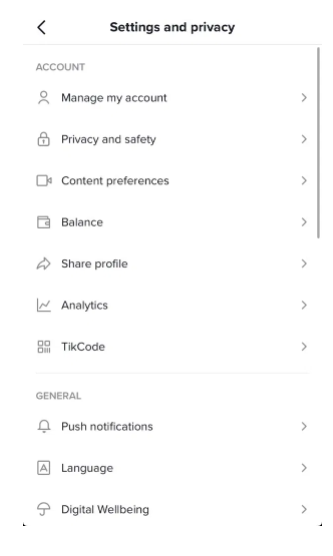
To share your TikTok profile, tap on “Share profile” Under “Account”.

After tapping on the three dots, it will open a menu.

The menu will be “Settings and privacy” menu.

On the menu, there are multiple headers such as “Account”, “Content & Activity”, “Cache & Cellular Data”, and so on.

A “Share profile” option will be available under the “Account” header.

The “Share profile” feature is the option that you’ll desire to use as it enables you to copy your TikTok URL.

You can also share your TikTok profile with the help of this URL with others from different methods.

To share your TikTok profile with others, you need to tap on “Share profile”.

Go to the last step to learn how to copy your TikTok profile URL so that you can share or send it to others.

Step 3. Tap on “Copy Link”

Under “Share to”, tap on “Copy link” to copy your TikTok’s profile URL.

After tapping on “Share profile”, it will open a navigation menu.

On the menu, there are two headers including “Send to” and “Share to”.

Under “Send to”, there will be the TikTok users you’ve interacted with the most.

You can send them your TikTok profile URL by tapping on one of those users via a direct message.

Under “Share to”, there are multiple sharing options available.

You can copy your TikTok’s profile URL, and send it to different social media platforms like WhatsApp, Facebook, Messenger, and so on.

Since you want to copy the URL of your profile, tap on “Copy link”.

After tapping on “Copy link”, it will show you a “Copied” announcement bar.

This indicates that you’ve successfully copied your TikTok URL to the clipboard of your phone.

It means that you can paste the link and send it to your friends and dear ones.

How do I change my TikTok URL?

To change your TikTok URL, the requirement is to change your username too.

After changing your username, your TikTok URL will be changed too.

First of all, go to your TikTok profile and tap on “Edit profile”.

After that, tap on the “Username” field to change it.

In the end, change your current username to a new username.

Just remember that you can only change your TikTok username after 30 days.

Therefore, before you change your username, you should be careful and you should know it first.

Final Words

TikTok usernames are unique, which shows that you cannot choose the same username as someone else is using on the app.

However, TikTok names are not unique, so the same name can be selected if you want even if another user has it.

The reason behind it is that your TikTok username is included in your profile URL and not your name.

Therefore, if you want to share your TikTok account with others, it’s an ideal way you tell them your username.

On the other hand, you can also use the instructions in this guide to copy your URL.

What’s Next

How to Upload Videos to TikTok From Your Gallery

How to See Your Liked Videos on TikTok

What Does “Clear Cache” Mean on TikTok?

Arsalan Rauf
Arsalan Rauf

Arsalan Rauf is an entrepreneur, freelancer, creative writer, and also a fountainhead of Green Hat Expert. Additionally, he is also an eminent researcher of Blogging, SEO, Internet Marketing, Social Media, premium accounts, codes, links, tips and tricks, etc.

www.greenhatexpert.com

Filed Under: Social Media, TikTok

How to Fix “Too many attempts. Try again later” on TikTok

Last Updated on April 22, 2023 By Arsalan Rauf

Have you come across a “Too many attempts. Try again later” error on TikTok?

It can occur due to two reasons.

First of all, there is a chance that you are sending too many codes to your mobile number.

It will restrict you from sending codes if you are sending the codes too many times.

The next reason can be too many failed login attempts.

The restriction will be posed on the account if the person is failed to login in many attempts and as a result, the person will not be able to log in temporarily.

Either way, it is happening because the IP address of yours is blacklisted in TikTok servers for a while.

Therefore, you cannot perform these tasks for a few minutes to a few hours.

In this post, I am going to discuss how to fix “Too many attempts. Try again later” on TikTok if you cannot log in or send a code to your phone number/mobile number.

How to Fix “Too many attempts. Try again later” on TikTok

You can delete the app and reinstall it to fix “Too many attempts. Try again later” on TikTok, or you can also use a VPN.

If everything is not working, the only thing you can do is wait for the error message to be lifted.

Usually, the “Too many attempts. Try again later” error lasts for more or less an hour or less.

It can also last for a few hours too but in a few cases.

However, this error is temporary so it will be removed soon.

You can also delete and reinstall the app to fix this issue because the process clears the cache.

Apart from that, a VPN has the ability to mask your IP address and it will lift the ban.

There are 3 working methods to fix the “Too many attempts. Try again later” on TikTok.

Method 1: Delete and reinstall TikTok app

The easiest way is to remove and reinstall TikTok app.

To delete it, you need to locate the app on your device.

After reaching the app, tap and hold it.

It will open several options for you in a menu form.

If your device is iOS, the options are “Start recording”, “Notifications”, “Discover” and so on.

You need to tap on “Remove app” in order to delete it.

After removing it, you need to visit the Google Play store or app store.

Now, reinstall TikTok application and open it.

In the process of removing and reinstalling TikTok, the “Too many attempts. Try again later” error will be fixed.

It happens because the process erases the cache.

IP ban is lifted from the app when the cache of the app is cleared.

As a result, tiktok will be opened without any ban.

Method 2: Use a VPN

The second way to uplift this ban is to use a VPN.

To get started, your task is to download a VPN app for free.

First of all, visit the Google play store.

Now, in the play store, search for the term “Free VPN” in the search bar.

There are a number of VPNs available there which you can install.

Super VPN is one of them which I recommend whether you are using app store or Google plays tore.

After downloading the VPN, you need to open it to start the connecting process.

You can connect to a VPN and use a country like (India, France, USA and Germany etc).

After doing so, open the TikTok app and try to repeat the same action again.

This time, you are not going to receive this “Too many attempts. Try again later” error.

It disappears because a VPN connection will mask the IP address.

Method 3: Wait it out

The last way to get rid of this error is to wait it out.

The “Too many attempts. Please Try again later” error on TikTok is not a permanent error.

Hence, you need to wait unless the error message is disappeared on its own.

Usually, the error lasts for less than an hour.

There are some cases where it can exceed an hour, but as a result, it will be gone.

In short, the solution to this problem is available in the error message that is, “Try again later”.

If you are still getting this error of Too many attempts on Tiktok, you can use the other 2 ways to get rid of it.

What does too many attempts mean on TikTok?

The “Too many attempts” means that your IP address has been banned from using TikTok. This usually happens because you tried to log in too many times at once.

Final Words

The error message “Too many attempts. Try again later” states that TikTok has temporarily banned your IP address.

It happens when you repeat the same action multiple times.

It includes the process of sending a code to your phone number or trying to log in many times.

Whenever you come across this error, the best way to deal with it is to wait it out.

You can wait for it to be lifted because the error is temporary.

I hope that I have fixed this error by giving you multiple methods to deal with it.

What’s Next

How to Recover Your TikTok Account Without Email or Phone

Arsalan Rauf
Arsalan Rauf

Arsalan Rauf is an entrepreneur, freelancer, creative writer, and also a fountainhead of Green Hat Expert. Additionally, he is also an eminent researcher of Blogging, SEO, Internet Marketing, Social Media, premium accounts, codes, links, tips and tricks, etc.

www.greenhatexpert.com

Filed Under: TikTok

How to Fix “You’re tapping too fast. Take a break!” on TikTok

Last Updated on April 23, 2023 By Arsalan Rauf

Is your TikTok showing this error message that “You’re tapping too fast take a break!”?

A number of users are experiencing this problem these days, especially new users.

It can be a hurdle whenever you try to like or comment on any video.

The error will stop you from supporting your favorite content creator.

Read this post carefully to get help on how to fix the error and it will not happen again too.

Why is TikTok showing this error: You’re tapping too fast take a break?

The question arises why TikTok keeps showing the error You are tapping too fast, take a break whenever a users tries to like a video?

The error is an indication that you are commenting or liking videos too fast and not even watching them completely.

When you like a lot of videos without fully watching them, TikTok will detect this activity and flag you as a bot and block you from liking/commenting for a period of time.

It usually happens with the new comers.

It is because it takes a while to trust the newer accounts.

If you are new and recently created an account on TikTok and like multiple videos without watching them, the TikTok system will think you’re a bot and restrict you from these actions.

The newer accounts get into trouble for a number of actions on TikTok. It also includes the inability to get on the for You Page on TikTok.

TikTok is also being used for automation purposes and many fake accounts are being created for its sake.

Therefore, the platform restricts the fake accounts by detecting the bots and spam using the algorithm designed for it.

Hence, if you are a new user and keeps liking the videos without watching the full length of video, you may experience the error: You’re tapping too fast, Take a Break!

How long does the error message last?

The error message continues for several minutes, several hours or even for 24 hours or more than this time.

If your account is new, you may be blocked for a longer span because Tiktok loses the trust in your account.

On the contrary, the block does not continue for long period on older accounts due to the built trust in TikTok.

But you do not have to worry about it, eventually it will be removed because it is temporary not permanent.

How to Fix: You’re tapping too fast take a break on TikTok

To fix the issue “You’re tapping to fast. Take a break!” on TikTok, you can either wait for the clearance, clear your cache, reinstall the tiktok application, or create a new account.

Let’s have discussion on all these methods one by one.

1. Wait for the Clearance

The most common or used method of fixing the You’re breaking too fast take a break error on tiktok is to wait for the algorithm or tiktok to open it.

The unblock process may take a few minutes, an hour or more than that depends on how many times you have come across this error message.

The best and easy way to fix it is to wait and the block will be lifted.

It is because the issue is temporary not permanent.

Hence, your restrictions will be removed with time.

2. Clear your cache

The second step is to clear the cache, it is the saved data on the application.

Clearing the cache may lift the ban from the account.

Furthermore, it will also clear some space on the android.

Here’s a step-by-step guide on how to clear your cache on the TikTok application.

Go to your settings.

tiktok setting and privacy

Firstly, navigate to your profile.

Then, tap on the “triple-dots” icon on the top-right hand corner of the screen.

The tap will show the settings and privacy page to the user.

Navigate to the bottom of the page.

Scroll down to the very end of the Settings and privacy page.

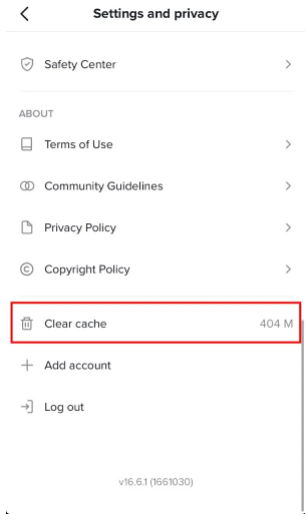
Above the “Add account” option, there is a “Clear cache” option available.

Tap on “Clear cache” to clear the cache of app.

tiktok clear cache

That is it.

After clearing the cache on the app by tapping on it, an animation will be loading on the screen.

If the number on the right side of “Clear Cache” option has turned in to “0 M” it means that you have done the job of clearing the cache successfully.

3. Reinstall the app

If your profile is new, it means you can go for this method that is, to reinstall the TikTok application.

On the home page, delete the application from the device.

Visit the Google Play store and reinstall the Tiktok app.

Reinstallation process will delete the most of the cache, data, and settings so it will get rid of the issue You are tapping too fast take a break from showing.

4. Create a new account

If all the previous options are not working for you, then try making a new account.

When you create a new account, the account will be in a fresh state, so no more blocks on the account.

However, the same mistake should not be repeated that you did in the previous account.

It is because it will get you blocked/banned again.

A new account is also necessary if anything happens to the main account.

For example, if your main tiktok account gets deleted/blocked, you can inform your followers using the secondary account.

How to Prevent: You’re tapping too fast take a break on TikTok

How to save yourself from You’re tapping too fast take a break error on Tiktok from appearing on your screen?

To save yourself from this error, make sure you watch full length of the video before taking any action on the video such as liking or commenting on it.

These instructions are especially for a new account:

1. Watch the entire video before liking it

It is necessary for the new tiktokers to watch the entire video before liking or commenting on it.

If you will not do it, TikTok will flag you as a bot and block you from performing more actions.

The new accounts are at risk because the algorithm of TikTok doesn’t trust the new user.

So, if you have created a new account, you should abstain from liking or commenting on videos.

2. Use the TikTok app like a human

It may sound weird to you but if you want to save your account from the error, you need to stop acting like a robot.

In short, you need to use the app like a normal human, follow, like or comment the videos with intervals and do not spam these actions.

When you behave like a robot, follow, like or comment without intervals, Tiktok considers you as a bot and blocks your actions on the app.

Why does TikTok say you’re tapping too fast? (another common error)

Apart from the error, you may experience another error that is, You’re following too fast.

You can experience this error if you have exceeded the limit of following on TikTok.

Usually, the user should not follow more than 30 users per hour on the app.

So here is a tip whenever you follow users, ensure you are doing it in intervals to prevent the block.

Final Words

If you are getting the error You’re tapping too fast take a break on Tiktok, it is happening because you are doing actions too fast without watching the content(video) from the beginning to the end.

To save yourself from this issue from happening again, you need to watch the entire video before you like or comment on it.

So the TikTok app will consider that you are a human not a robot.

Related Posts:

How to Find a TikTok Video

Working Ways to Earn Money on Tiktok

How to change Tiktok username without waiting

What Does Clear Cache Mean on Tik Tok

Arsalan Rauf
Arsalan Rauf

Arsalan Rauf is an entrepreneur, freelancer, creative writer, and also a fountainhead of Green Hat Expert. Additionally, he is also an eminent researcher of Blogging, SEO, Internet Marketing, Social Media, premium accounts, codes, links, tips and tricks, etc.

www.greenhatexpert.com

Filed Under: Social Media, TikTok

How to Fix “Post unavailable” on TikTok

Last Updated on April 23, 2023 By Arsalan Rauf

Are you getting a “Post unavailable” error on TikTok and looking for a way to fix it?

A lot of users are facing this error message on their “For You” page.

It typically happens for underaged users on TikTok.

For instance, if you’re 13 years old, the error message will be shown to you when you view inappropriate content.

In this post, I will tell you why TikTok says the post is unavailable and how to fix “Post unavailable” on TikTok.

Why does TikTok say the post is unavailable?

TikTok says the post is unavailable because either you are underage or you’ve set your age to 13 to 15 years old.

If you’re underage, posts that TikTok algorithm marked as “inappropriate” will be restricted for you.

The aim of TikTok is to create a safe and welcoming platform for everyone.

Having said that, they released a lot of privacy and safety settings.

You cannot edit some privacy and safety settings if you’re underage.

For instance, if your age is between 13 to 15 years, the “Video downloads” setting is turned off by default and you cannot change it.

Same is the case with the feature to watch “inappropriate” videos on TikTok is restricted for underaged users by default.

Having said that, some users are aged 18 or above but some posts on their “For You” page are still protected.

If that’s the case, the “Post unavailable” message is happening because of a bug.

A username named @Lamiixo tweeted, “When did TikTok start having “post unavailable”?”.

Apparently, @Lamiixo is not the only one getting this error message as many other users are reporting it on Reddit, YouTube, and other social media platforms.

How to fix “Post unavailable” on TikTok

To fix “Post unavailable” on TikTok, the first thing is to turn off “Restricted Mode”.

If you’ve mistakenly set your age to below 16, the only way is to contact TikTok to change/update your birthday.

You can access all the features on TikTok if you’re 18 years old or above.

On the other hand, you can create a new TikTok account and set your age to 18 or above.

Method 1. Turn off “Restricted Mode”

  1. Firstly, go to TikTok and go to your profile.
  2. Tap on the menu icon.
  3. Now, select “Settings and privacy”.
  4. Tap on “Digital Wellbeing”.
  5. Now, select “Restricted Mode”.
  6. Tap on “Turn off” to turn it off.

After tapping on “Turn off”, you need to provide the passcode that you’ve set.

If someone turned off restricted mode for you, the passcode is imperative so you need to ask for the passcode for this purpose.

Restricted mode restricts videos that may not be suitable for some people.

Therefore, if you want to see all videos on your “For You” page, restricted mode should be disabled.

Method 2. Contact TikTok (to update your birthday)

  1. Firstly, go to the “Share your feedback” form.
  2. Enter your email address.
  3. Provide your TikTok username.
  4. Select “Change account information” as the category,
  5. Select “General question” or “Other” as the subcategory.
  6. Explain your issue in the “How can we help?” field.
  7. Agree with the statements.
  8. Lastly, submit the form.

In the “How can we help?” field, you need to describe the problem for which you need help.

For instance, if you’ve accidentally set your age to 13 years old but you’re actually 18 years old, you need to describe it.

To prove your age, you can also attach a photo of your ID.

After submitting the form, you need to wait for a few days to get TikTok’s response.

TikTok will send a reply to you by email, so make sure to check your junk/spam folder too.

If you’re 18 years old or above but you’re getting the “Post unavailable” issue, choose the “Report a bug” category instead of the “Change account information” category.

An example of a description to write, “Hi TikTok team, I’m 18 years old but I’m still getting the post unavailable error when I see certain TikTok videos. Please help me to fix this”.

You can also report a problem on the app by visiting your profile > Menu > Settings and privacy > Report a problem.

Method 3. Create a new TikTok account

The final solution is to create a new TikTok account.

This is the ideal way to avoid the “Post unavailable” error from happening.

When you’re creating a new TikTok account, you need to ensure that you set your age to 18 years old or above.

The reason behind it is that if you set your age to 13 years old, you won’t get access to a lot of features on TikTok.

The features are the ability to watch videos that are deemed inappropriate.

What’s Next

Good, Cute, and Cool TikTok Profile Pictures

Top 10 Most Viewed TikTok Videos

How to Delete All of Your TikTok Posts

Arsalan Rauf
Arsalan Rauf

Arsalan Rauf is an entrepreneur, freelancer, creative writer, and also a fountainhead of Green Hat Expert. Additionally, he is also an eminent researcher of Blogging, SEO, Internet Marketing, Social Media, premium accounts, codes, links, tips and tricks, etc.

www.greenhatexpert.com

Filed Under: Social Media, TikTok

How to Fix “This post is age-protected” on TikTok

Last Updated on August 6, 2022 By Arsalan Rauf

Are you getting a “This post is age-protected” error on TikTok and are you looking for a way to fix it?

A lot of users are facing this error message on their “For You” page.

The message usually occurs for underaged users on TikTok.

For instance, if you’re 13 years old, the error message will be shown to you when you view inappropriate content.

In this post, I will tell you why TikTok says age protected and how to fix “This post is age-protected” on TikTok.

Why does TikTok say age protected?

TikTok says age protected because either you are underage or you’ve set your age to 13 to 15 years old.

If you’re underage, posts that the TikTok algorithm marked as “inappropriate” or “mature” will be restricted for you.

The aim of TikTok is to create a safe and welcoming platform for everyone.

Therefore, they released a lot of privacy and safety settings.

You cannot change some privacy and safety settings if you’re underage.

For instance, if your age is between 13 to 15 years, the “Video downloads” setting is turned off by default and you cannot change it.

Similarly, you will be also restricted from watching “inappropriate” videos on TikTok which are blocked for underaged users by default.

Having said that, some users are aged 18 or above but some posts on their “For You” page are still protected.

If you see it, the “This post is age-protected” message is happening due to a bug.

A username named @Cybrl0li tweeted, “Hey @tiktok_us, it says “This post is age protected” but the restrict mode is off but I’m 18 years old”.

Apparently, @Cybrl0li is not the only user who is experiencing this issue as a lot of other users are complaining about it on Reddit, YouTube, and other social media sites.

How to fix “This post is age-protected” on TikTok

To fix “This post is age-protected” on TikTok, the first thing is to turn off “Restricted Mode”.

If you’ve accidentally set your age to below 16, the only way is to contact TikTok to change/update your birthday.

You can access all the features on TikTok if you’re 18 years old or above.

If everything fails, you can create a new TikTok account and this time, you should set your age to 18 or above.

Method 1. Turn off “Restricted Mode”

  1. Firstly, go to TikTok and go to your profile.
  2. Tap on the menu icon.
  3. Now, select “Settings and privacy”.
  4. Tap on “Digital Wellbeing”.
  5. Now, select “Restricted Mode”.
  6. Tap on “Turn off” to turn it off.

After tapping on “Turn off”, you need to provide the passcode that you’ve set.

If someone turned off restricted mode for you, the passcode is imperative so you need to ask for the passcode for this purpose.

Restricted mode restricts videos that may be inappropriate for some people.

Therefore, if you want to view all videos on your “For You” page, the restricted mode should be turned off on the app.

Method 2. Contact TikTok (to Update or to change your birthday)

  1. Firstly, go to the “Share your feedback” form.
  2. Enter your email address.
  3. Provide your TikTok username.
  4. Select “Change account information” as the category,
  5. Select “General question” or “Other” as the subcategory.
  6. Explain your issue in the “How can we help?” field.
  7. Agree with the statements.
  8. Lastly, submit the form.

In the “How can we help?” field, you need to explain the problem and what you need help with.

For instance, if you’ve mistakenly set your age to 13 years old but you’re actually 18 years old, you need to explain it.

To prove your age, you can also attach a photo of your ID.

After submitting the form, you need to wait for a few days to get TikTok’s response.

TikTok will send a reply to you by email, so make sure to check your junk/spam folder too.

If you’re 18 years old or above but you’re getting the “age-protected” error, choose the “Report a bug” category instead of the “Change account information” category.

An example of a description to write, “Hi TikTok, I’m 18 years old but I’m still encountering the age-protected error when I see certain TikTok’s videos. Please help me to fix this”.

You can also report a problem on the app by visiting your profile > Menu > Settings and privacy > Report a problem.

Method 3. Create a new TikTok account

The last way is to create a new TikTok account.

This is the ideal way to avoid the “This post is age-protected” error from happening.

When you’re creating a new TikTok account, you need to ensure that you set your age to 18 years old or above.

The reason behind it is that if you set your age to 13 years old, you won’t have access to a lot of TikTok’s features.

The features are the ability to watch videos that are detected as inappropriate.

What’s Next

Good, Cute, and Cool TikTok Profile Pictures

Top 10 Most Viewed TikTok Videos

How to Delete All of Your TikTok Posts

Arsalan Rauf
Arsalan Rauf

Arsalan Rauf is an entrepreneur, freelancer, creative writer, and also a fountainhead of Green Hat Expert. Additionally, he is also an eminent researcher of Blogging, SEO, Internet Marketing, Social Media, premium accounts, codes, links, tips and tricks, etc.

www.greenhatexpert.com

Filed Under: Social Media, TikTok

How to Fix “Setting restricted by TikTok to protect your privacy”

Last Updated on August 6, 2022 By Arsalan Rauf

Are you getting a “Setting restricted by TikTok to protect your privacy” error and want to fix it?

If yes, you won’t be able to change certain privacy settings.

The settings are changing your privacy setting for duets and stitches.

As a result, other TikTok users will not be able to duet or stitch your videos.

Not every user on TikTok get their settings restricted.

If you are one of those users, there are two methods to fix it.

In this post, I will tell you what “Setting restricted by TikTok to protect your privacy” means and how to fix it.

What does it mean when TikTok says setting restricted by TikTok to protect your privacy?

Setting restricted by TikTok to protect your privacy means that your age is under 16.

If you’re not 16 years old, TikTok will restrict certain settings for you.

The restriction will be the ability to enable duets and stitches.

In 2021, TikTok released the change to ensure safety for their younger users.

As a result, TikTok will set the accounts for users who are 13-15 years old to private by default.

Additionally, certain privacy settings will be restricted for those users.

TikTok also made a partnership with Common Sense Networks to pick the age-appropriate and engaging media experiences for kids.

Therefore, if you’re getting the “Setting restricted by TikTok to protect your privacy” issue on TikTok, it shows that you won’t be able to enable duets and stitches.

The reason for this is TikTok has disabled that setting for users who are below the age of 16 years.

How to fix “Setting restricted by TikTok to protect your privacy”

To fix “Setting restricted by TikTok to protect your privacy”, the best way is to request them to change your age to 16 years old or above.

On the other hand, you can make a new TikTok account and set your age at least to 16 years old or above.

To change your account information on the app, you need to make a request using the feedback form of TikTok.

If you have mistakenly set your age to under 16 years old, you can request them for change.

However, you need to provide a photo of your ID to prove that.

There is another method you can use to bypass the restricted settings is to create a new TikTok account.

By using this method, you need to ensure that you set your age to 16 years old or above.

After doing so, you will be able to have access to all features on TikTok.

#1: Request TikTok to change your age

The first way is to request TikTok to change your age on the app.

Unfortunately, you cannot change your age manually from the settings.

The reason is that TikTok does not support that feature.

Otherwise, it will be an easy task to bypass certain restrictions on TikTok by just changing the age.

You need to use the TikTok feedback form if you want to change your age on TikTok.

First of all, go to the TikTok feedback form from this URL: https://www.tiktok.com/legal/report/feedback.

After opening the form, provide your contact information.

The information contains your email address and TikTok username.

Then, choose “Change account information” as the topic and “Other” as the subtopic.

After doing so, explain that you’ve accidentally or mistakenly set your age to under 16 and that your actual age is “17” years old.

In the end, attach a photo of your ID to prove your age and submit the form.

After submitting the form, you need to wait for a few days to get TikTok’s response.

If you are successful, TikTok will change your age on the app and you’ll be able to make changes to your privacy settings without getting the “Setting restricted by TikTok to protect your privacy” error!

#2: Create a new TikTok account

The second way is to create another TikTok account.

When you use this second method to make a new account, you need to ensure to set your age to 16 years or above, I recommend 18 years.

This process will enable you to change your privacy settings on the app.

First of all, open TikTok app, tap on the profile icon, tap on your username on the top bar, and tap on “Add account”.

After tapping on the “Add account”, tap on “Use phone or email”.

Make sure to set your birthday on the “Sign up” page that you’re 18 years old.

Now, tap on “Next” and follow the instructions available on-screen to complete the account completion.

After setting up your age as more than 16 years old or at least 16, you’ll be able to change all of your privacy settings.

The changes are allowing duets and stitches.

Final Words

TikTok needs every user to add their birthday in the account creation process.

If you’re under the age of 16 years old, certain privacy settings will be available or accessible for you.

Additionally, the default privacy settings are also there.

For instance, it will set your account to private by default.

Additionally, it will also turn off the “Suggest your account to others” settings by default.

TikTok has implemented such changes to keep the young lot safe.

You can uplift these restrictions by making a new TikTok account and setting your age to more than 16 years old.

If you’re about to reach 16 years old soon, you can wait until you reach.

After turning 16, you will be able to change certain privacy settings such as duets and stitches.

If you are unable to change certain privacy settings even though you’re of age, you can contact TikTok from their feedback form.

What’s Next

How to See Who Viewed Your TikTok Profile

Top 10 Most Viewed TikTok Videos

Top 20 Trending TikTok Songs

Arsalan Rauf
Arsalan Rauf

Arsalan Rauf is an entrepreneur, freelancer, creative writer, and also a fountainhead of Green Hat Expert. Additionally, he is also an eminent researcher of Blogging, SEO, Internet Marketing, Social Media, premium accounts, codes, links, tips and tricks, etc.

www.greenhatexpert.com

Filed Under: TikTok

TikTok Live Requirements

Last Updated on August 6, 2022 By Arsalan Rauf

Do you want to go live on TikTok?

If yes, you need to fulfill the minimum requirements to go live.

TikTok introduced requirements so that not everyone can go live.

You can also receive gifts if you go live on TikTok.

As a creator, after receiving a gift, you can collect diamonds.

You can redeem the diamonds for money on TikTok.

However, you must reach a milestone of a minimum of 2,000 diamonds ($10) before you can cash out.

In this post, I will tell you the TikTok live requirements, how to get live access, and why can’t you go live.

TikTok live requirements

Here is the list of TikTok live requirements:

  • Users must be 16 years old and above to launch LIVEs.
  • Users 18 years old and more than that can send and receive gifts during a LIVE.
  • You need a to have at least 1,000 followers.

TikTok live enables creators to interact with their followers in real-time.

However, you need to fulfill the minimum requirements to go live on TikTok.

When you go live, the next thing you need to keep in mind is to follow TikTok’s community guidelines and terms of service.

They have published them to give rise to safe and positive environment on the app.

Unfortunately, even if you accumulate 1,000 followers, you won’t be able to go live on TikTok if your age is under 16 years old.

If you are 18 years old and more than that, you can send and receive gifts as well.

Just remember that live and gift features are not available for every region.

If you don’t have the live and gift functions, the best way is to wait for it to be available to you.

How to get live access on TikTok

To get live access on TikTok, you have to be at least 16 years old and above.

In addition, you also need to reach minimum of 1,000 followers.

If you fulfill these two requirements, you will get live access on TikTok automatically.

To go live, you need to tap on the “+” icon on the bottom bar.

After tapping on the “+” icon, it will open your camera.

Now, you will come across 3 tabs on the bottom of your camera.

The tabs are “Camera”, “Templates”, and “LIVE”.

The “LIVE” option will only available if you’re 16 years old and have 1K followers.

To go live on TikTok, you need to scroll to “LIVE” tab and tap on “Go LIVE”.

Why can’t I go live on TikTok?

You can’t go live on TikTok because you haven’t completed 1,000 followers.

Additionally, your age should be at least 16 years old.

You require at least 1,000 followers to go live on TikTok.

Additionally, the minimum age requirement to go live is 16 years old.

If you are under 16 years old, you can get suspended for going live on TikTok.

You can add your birthday on TikTok by visiting your profile > Menu > Settings and privacy > Manage account > Date of birth.

Just remember that it’s hard to change your date of birth if you have already set it.

If you’ve set a date of birth, the only way is to contact TikTok to change it.

It ca be done by reporting a problem on the app or submitting the TikTok feedback form.

After doing so, you need to wait 1-3 days to get TikTok’s response.

In addition, you might need to submit an official document such as your ID to verify your date of birth on TikTok.

Otherwise, wait until you reach the age of 16 via the date of birth that you’ve set on the app.

Final Words

You need to complete certain requirements on the platform before you can go live on TikTok.

There are various advantages of going live including building real connections in real-time with your viewers.

If your audience starts watching you, you will learn what your audience wants to see.

There are various practices to follow on TikTok if you want to go live there.

The practices are the time slot, length, activity, lighting, and so on.

In most cases, you should go live when your most of followers are available.

If you have any questions or issues regarding going live on TikTok, you can contact TikTok by telling them a problem on the app or use the feedback form.

What’s Next

How to Fix TikTok Not Working

Top 10 Most Viewed TikTok Videos

Good, Cute, and Cool TikTok Profile Pictures

Arsalan Rauf
Arsalan Rauf

Arsalan Rauf is an entrepreneur, freelancer, creative writer, and also a fountainhead of Green Hat Expert. Additionally, he is also an eminent researcher of Blogging, SEO, Internet Marketing, Social Media, premium accounts, codes, links, tips and tricks, etc.

www.greenhatexpert.com

Filed Under: Social Media, TikTok

How to Change Your Birthday on TikTok

Last Updated on August 5, 2022 By Arsalan Rauf

Changing your birthday on TikTok is a difficult task.

After signing up on TikTok for the first time, you’re required to enter your date of birth.

If you have set you age to under 13 accidentally, you won’t be able to use TikTok.

However, you can easily bypass this by creating a new account on the desktop version of TikTok.

But if you want to change your age on existing TikTok account where the age is already set, you need to use another solution.

For instance, if you’re under 16 years, you won’t be able to go live on TikTok even if you have completed 1,000 followers.

In this post, I will tell you how to change your birthday on TikTok in 3 steps and a couple of frequently asked questions.

How to change your birthday on TikTok

To change your birthday on TikTok, you have to use the feedback form to contact TikTok support.

On the feedback form, you will provide your contact information, the description of your issue, and an attachment of your ID.

After doing so, submit the form and wait for 1-3 business days to get TikTok’s response.

Unfortunately, the app does not allow you to change your birthday.

The reason for this is they have no date of birth settings on the app yet.

To change your birthday/age/birth date, the only way is to contact TikTok support.

You can use the app to contact TikTok support by your profile > three dots > report a problem > account and profile > editing profile > other > still have problem.

A photo of your ID can also be attached as proof of your age.

However, in this post, I will tell you how to contact TikTok via the feedback page instead.

#1: Visit the TikTok feedback page

Visit the TikTok Feedback page.

In order to change your birthday on TikTok, you need to contact them using the “Share your feedback” page.

First of all, go to a browser on a desktop or mobile device.

After that, visit the Google search engine and search for the terms “TikTok feedback” and click on the first link that says “Share your feedback”.

On the other hand, you can access the feedback page directly here tiktok.com/legal/report/feedback.

This page enables you to send your feedback to TikTok.

You can also describe the details about a problem that you’ve got on the app such as changing your birthday.

Either way, there is a chance to get a response from TikTok when you contact them from their feedback form.

Move on to the next step to see how to fill up the form correctly.

#2: Fill up your contact information

Enter your email address that is associated with your TikTok account, username, and a description of your problem.

After opening the form, there are 3 fields including ”Email address”, “Username”, and “What would you like to tell us?”.

First of all, enter your email address that is linked to your TikTok account.

For instance, if you’ve created an account on TikTok from the example@gmail.com email, enter that email.

Next, provide your TikTok username.

Your username (e.g. @greenhatexpert) can be found on your TikTok profile below your profile picture.

Although the field of username is optional, you should provide it just in case as TikTok team might need it.

Lastly, under the “Feedback” header, there will be a “What would you like to tell us?” field.

Describe that you want to change your birthday on TikTok because you’ve mistakenly put the wrong date of birth.

Here’s an example of a description, “Hi, I set a wrong birthday accidentally on TikTok when I created my account. Can you help me to change my date of birth to 01/01/2002?”.

Move on to the last step to see how to complete the form and submit it.

#3: Attach your ID and submit the form

Upload > attach a screenshot of your ID > submit.

After providing your contact information and the description of your problem, the next step is to attach your ID.

Attaching your ID will prove that you are telling them your real birthday that you want to change.

Otherwise, TikTok might not change it on your account.

First of all, you need to take a photo of your ID or scan it on a scanner.

Under the “Attachments (Optional)” header, there will be an “Upload” link.

By using the “Upload” link, you can upload up to 10 screenshots related to the problem you are facing.

Select “Upload” and choose a screenshot of your ID and the date of birth should be clear.

After doing so, select “Submit” to send the form to TikTok.

TikTok will then review your report and they usually send a response from them in 1 to 3 business days.

I hope that you have learned how to change your birthday on TikTok!

Why won’t TikTok accept my date of birth?

TikTok won’t accept your date of birth if you are less than 13 years old.

To sign up for TikTok, the criteria is to be at least 13 years old.

To go through the sign-up process for TikTok, you need to select a date of birth that is 13 years old or more.

If you have selected a date of birth that’s below 13 years old, you can use the desktop version for signing up on a TikTok instead of the mobile app.

Signing up for an account on the desktop version of TikTok will get rid  of the error message.

What is the age limit to go live on TikTok?

The age limit to go live on TikTok is at least 16 years old, you must be 16 years old to go live.

If you are below 16, you cannot go live on TikTok even if you have more than 1,000 followers.

To bypass this, you can contact TikTok support to help change your age or create a new account.

On the other hand, you can wait until you turn 16 years old to use the live stream feature on the app.

Final Words

Changing your age can be an irritating task on social media platforms.

On Facebook, you are allowed to change your birthday a limited number of times.

Alternatively, TikTok does not even contain a birthday setting, and you have to get help from TikTok support if you want to change it.

At the end of the day, these platforms aim to mitigate underage users from creating an account because content created by them might not be suitable for children.

What’s Next

TikTok Fairy Comments to Copy and Paste

How to Make High Quality TikTok Videos

How to Change Your “For You” Page (FYP) on TikTok

Arsalan Rauf
Arsalan Rauf

Arsalan Rauf is an entrepreneur, freelancer, creative writer, and also a fountainhead of Green Hat Expert. Additionally, he is also an eminent researcher of Blogging, SEO, Internet Marketing, Social Media, premium accounts, codes, links, tips and tricks, etc.

www.greenhatexpert.com

Filed Under: Social Media, TikTok

How to Make Money on TikTok – (The Definitive Guide)

Last Updated on August 21, 2022 By Arsalan Rauf

TikTok has become one of the eminent video sharing platforms since its release in 2017. It is an app which is available on android as well as on iOS. The company considers it as the leading short form video platform for mobile videos.

The main purpose of launching this app was to provide a platform for short entertainment videos using your smartphones. In July 2019, it became more popular among the masses and surpassed 500 million users per month.

Due to its immense popularity in the shortest time people usually search for “how to earn money on Tiktok” or “can you make money on Tiktok”. The answer to this question is yes. Currently, you cannot monetize your videos to get income but it does not mean that you cannot earn from this platform. One can become a videopreneur using this platform.

Currently, it does not have ad revenue for creators like YouTube or Dailymotion. I am optimistic that one day they will allow the creators to earn money from videos directly.

In this guide, I am going to share the best ways to earn money on TikTok app. One thing I want to clear that is, there is no “magical formula to become rich in a jiffy” if there was I will be using it. Everyone can try his luck, I have some ideas or you can say suggestions which you can use to earn money on this app. I shall be sharing some basics so that you can make your mind, it needs creativity as well as luck to proceed.

How to Earn Money on Tiktok

1: Become AN “INFLUENCER”

Become an influencer and it is an ideal way to making money from your presence. Recently, people took bad impression about influencer. It is because there are some people who purchase fake followers on their profiles including Instagram to be an influencer. It is a hard nut to crack to become famous and influential simply using your influence and virtue.

True influencers have actual organic followers, it means that actual human followers who give value and respect to the ‘influencer’. The world is replete with true influencers, it ranges from large to small scale.

If you have a friend whose musical taste you trust – your friend is an influencer, whether he has five fans like you or 5 million.

On the larger scale, Martha Stewart was once a powerful influencer, Oprah Winfrey was most far reach influencer, to make the book #1 best seller and make the author media figure, Oprah Winfrey just had to mention it.

The trend seems to be changing towards smaller influencers.

All the influencers I have mentioned in this article, they add value with their opinions.

You will not listen to your musically tuned in friend due to his/her cool website, or other friends ask you to, you listen to the music because you think he/she has a good taste of music.

Whenever he/she suggests an album of an artist, you will definitely go through it because you know it will be good.

Your friend is saving the time as well as the money every time he/she recommends something, that is why you pay attention to this influencer.

Why people consider movie reviews and food critics, is because they keep the bad films and crappy restaurants away from you and lead you to the good ones. They provide value to the world using the opinion that has proven useful for themselves. Martha Stewart offers amazing recipes and stunning craft projects to inspire people. Oprah Winfrey almost suggests the authors and books which are really good and worth considering.

Influencers are real and you can be one if you have the potential, if you are not adding value to something using your opinion, you should not be in the influencing line. This way, you will not be able to perform or maintain your popularity among your followers. You should have something valuable to attract the viewers.

If you have something valuable to say to the viewers, they can pay heed to your opinions, TikTok provides you the opportunity to monetize your videos. All you need to do is to recommend or suggest services and products that you genuinely think are best. It includes the stores, artists and brands and those brands will be happy to compensate you for this review. For this purpose, you should have genuine and organic followers. If you will be a real influencer, you can earn thousands of dollars with ease for recommending someone’s product or brand.

You need to keep in mind that plenty of influencers get into trouble by accepting the deals of brands and they do not disclose the deal to their followers. It somewhat reduces your opinion’s value to a number of people, so I suggest you should reveal that you are getting these kinds of deal. It is because the adverse results of the deal being revealed that you didn’t reveal will become a huge scandal for you and it will damage your reputation as a influencer.

2: LIVE STREAMING

Whether lip-syncing or live, live streaming on tiktok used to happen through live.ly URL but now it is moved on to musical.ly. The basic system is simple. Tiktok users can purchase coins with the help of real money using in-app purchases option. They can use coins as a currency to tip tiktok creators, by giving them a small amount of real money as a thank you for creating a good piece of live content. Tiktok provides 80% of the value of the real tip to the person performing a live stream on tik tok. In this way, he/she builds their account and attracting the brands that this user is creating good content to influence others.

It will not make you rich but it can be part time income stream, but you will make money on tiktok in the form of digital gifts rather than cash, it is not difficult to turn it into cold hard money.

3: PROMOTING / SELLING YOUR OWN VENTURES

This can be the most realistic way to earn money on Tiktok, even without getting a huge followers or becoming a national scale influencer. The secret is to have a store or business, and use tiktok as a medium to promote your services or sell your products. The great thing is that it can be any legal business or services, whether it is crafty, techy, or nerdy, you can do it.

For instance, you can provide a river rafting service to offer people raft trips to Colorado river every summer. You can make videos of every raft trip, and use the 15 second clips to attract the people by showing the fun people are having from your services. Post this video with some promotional frames, show them how to get in touch with you, what are your charges, where are you, when is your next trip, how to book it etc. Tiktok is not paying the users directly but with your clientele, you can earn thousands of dollars by attracting more clients using your videos. You can also create your Facebook page or YouTube channel to promote these videos there.

There is another way to earn money on Tiktok platform, for example, if you are in the crafts business and making cool melted glass and glass sculptures. You make videos on them, how to do it, show them techniques and also tell them how good are you in your field, show them your best work and in the end mention your website and share a link too. This way, you will not only attract the viewers but also be able to sell them your items.

Luckily, you can advertise your business on this social media platform too even if it isn’t something that can be used in a video. When you upload a video that is funny, creative or musically great, it will attract the viewers and you can add the service and products of your business.

4: Use AMAZON REFERRAL/AFFILIATE LINKS – Ecommerce Earning

It is another way of making money on TikTok with the help of Amazon affiliate links only if you will do it right. Don’t confuse your viewers. How will you promote anything without having links on your videos and bio? You cannot force the viewers to write down the referral link into the browser even if they did do that, it will end up losing an Amazon account. It is against the rules of Amazon’s link system. A manual link entry will allow the viewers to open it by tapping it or clicking it, but the question arises how do we do that?

Your bio is the best place where you can add written information on Tiktok platform (you can also add text to your videos but it can distract the viewer from the video). However, you cannot add links on your bio page, the text you add there is not clickable or tappable. Additionally, the viewers cannot even copy and paste it into the browser. Here what will you do? You need to add short text: it means a short URL for affiliate marketing landing page, it will work well if it is short.

On the landing page of your affiliate marketing, you can add amazon affiliate links. You may lose some sales due to the typing of the URL so a shorter URL will make the experience better. You need to have the right affiliate links for your video viewers, for instance, if you are making a 20-second lipsync video of any singer’s song. It will not inspire anybody to visit your page and order any sports equipment from Amazon but it can inspire them to buy that particular singer’s album right?

Related Read: How to See Who Watched Your Tiktok

FAQs (Frequently Asked Questions)

How to make money on Tiktok Live?

The main purpose of creating this platform is to share videos and spend time, there is no idea of users to earn money from it.

Here are two ways to earn money on Tiktok live:

1: Sell products

You can interact with your viewers in real-time and earn money from selling products while live streaming on Tiktok. Advertise the product and ask them to visit your bio to get a link to reach there.

2: Brand Promotion

It is another way of earn money on tiktok live, if you have thousands of followers, you can promote brands and get money from the brands.

3: Collect Donations

It is the simplest way to earn money on tiktok live, you go live and collect donations from your followers. The users can receive coins from their fans.

How does Tiktok Earn Money?

Tiktok monetizes this platform using ads and sponsored marketing with the help of partnerships to earn money. However, you cannot earn like Tiktok because the users do not have any monetization facility yet. You can earn money if you get any sponsorship opportunities from brands.

Can you Earn Money from Tiktok?

Yes, if you are an influencer on Tiktok, you can earn more than $40,000 per promotion because the giant influencers are doing this with their outstanding and engaging content. The influencer can charge the brands per view or set an amount as per the followers.

However, there is not direct way to make money from Tiktok because the app does not pay any incentives to its users even if they are creating and promoting valuable content.

Can I Monetize my Tiktok Videos?

No, you cannot monetize your TikTok videos because the platform does not offer a monetization option for the creators yet. However, we have mentioned a number of ways to earn money on Tiktok in this post.

How Much Do Tiktok Content Creators Earn?

If you have more or less 10 million followers, you can earn $10,000 to $20,000 by promoting brands in the forms of ads.

Final Words

That’s it, guys. I hope that you have liked this post on how to make money on TikTok. Do you have any suggestions for earning money on TikTok? If yes, leave them in the comment section and we shall update the post.

Arsalan Rauf
Arsalan Rauf

Arsalan Rauf is an entrepreneur, freelancer, creative writer, and also a fountainhead of Green Hat Expert. Additionally, he is also an eminent researcher of Blogging, SEO, Internet Marketing, Social Media, premium accounts, codes, links, tips and tricks, etc.

www.greenhatexpert.com

Filed Under: Social Media, TikTok

  • « Previous Page
  • 1
  • 2
  • 3
  • 4
  • 5
  • 6
  • 7
  • Next Page »


Recent Posts

  • Free DeepSeek Accounts 2026
  • Free Zoho Mail Accounts 2026
  • Acudepot Discount Codes 2026
  • Free Blackshot Accounts 2026
  • Free GMX Email Accounts 2026
  • Songtrust Discount Codes 2026
  • Uzicases Discount Codes 2026
  • Cardillo Promo Codes 2026
  • Free DriverFix License Keys 2026
  • Avast Secureline VPN Activation Codes 2026

Recommended Posts

Create a Gmail Account Without Phone Number

Free Course Hero Account

Crunchyroll Accounts

Cracked Apps

Free Pokemon Go Accounts
Onlyfans Free Accounts
Free Chegg Accounts
Free Paypal Accounts
Free Gmail Accounts
Funny Steam Names

Categories

  • Apps
  • Apps for PC
  • Blogging
  • Discord
  • Facebook
  • Gaming
  • Grammar
  • Guide
  • How to
  • Instagram
  • Messaging
  • OnlyFans
  • Pinterest
  • Reddit
  • SEO
  • Snapchat
  • Social Media
  • Spotify
  • Steam
  • Telegram
  • TikTok
  • Twitch
  • Twitter
  • Whatsapp
  • WordPress
  • YouTube
  • Home
  • Social Media
  • Messaging
  • About
  • Submit Guest post