Green Hat Expert

  • Home
  • Social Media
    • Instagram
    • TikTok
    • Snapchat
    • Facebook
    • YouTube
    • Twitter
  • Messaging
    • Discord
    • Telegram
    • Whatsapp
  • About
  • Submit Guest post
You are here: Home / Archives for How to

How to Unlock the Hidden Teleport Waypoint Under Chatrakam Cave in Genshin Impact

Last Updated on August 30, 2022 By Arsalan Rauf

Genshin Impact contains multiple missions/quests that you need to complete for rewards.

The game also contains side quests, cutscenes, stories, and so on.

Some quests may look easy to you, but they are very hard in reality.

For instance, you might not be able to solve a puzzle.

However, the solution to the puzzle is clear.

In other cases, some puzzles or tasks are hard to complete as there are little or no hints for them.

You need to perform the task in the game in which you have to unlock the hidden teleport waypoint under Chatrakam Cave.

However, a lot of players have no idea where the entrance is located.

The reason behind it is that you will not get any directions.

In this post, I will tell you how to unlock the hidden teleport waypoint under Chatrakam Cave in Genshin Impact.

How to unlock the Hidden Teleport Waypoint Under Chatrakam Cave in Genshin Impact

Here are the steps on how to unlock the hidden teleport waypoint under Chatrakam Cave in Genshin Impact

  1. Finish the “Agnihotra Sutra” quest first.
  2. Go to the northwest of Chatrakam Cave.
  3. Cross the river and jump down the waterfall in the opening.
  4. Go forward and fly to the top.
  5. To activate the waypoint, activate 4 Dendro Totems.
  6. Play the Old Lyre to fix the Dendro Totem.

You need to finish the “Agnihotra Sutra” quest to unlock the entrance to Chatrakam Cave.

The cave entrance is available northwest of Chatrakam Cave under a waterfall.

Jump down the waterfall, move forward, reach the top, and activate 4 Dendro Totems.

After activating the 4 Dendro Totems and played the Old Lyre, the teleport waypoint will be unlocked.

You’ll also get 5 Primogems for unlocking it.

After that, you can now teleport to the waypoint whenever you want regardless of the time.

What’s Next

Funny Genshin Impact Signatures

How to “Head to the Grove of Dreams to find Arakunti” in Genshin Impact

How to Get Sapwood Blade in Genshin Impact

Arsalan Rauf
Arsalan Rauf

Arsalan Rauf is an entrepreneur, freelancer, creative writer, and also a fountainhead of Green Hat Expert. Additionally, he is also an eminent researcher of Blogging, SEO, Internet Marketing, Social Media, premium accounts, codes, links, tips and tricks, etc.
www.greenhatexpert.com

Filed Under: Gaming, How to

How to “Head to the Grove of Dreams to find Arakunti” in Genshin Impact

Last Updated on August 30, 2022 By Arsalan Rauf

Genshin Impact contains multiple missions/quests that you need to complete for rewards.

The game also contains side quests, cutscenes, stories, and so on.

Some quests may look easy to you, but they are very hard in reality.

For instance, you might not be able to solve a puzzle.

However, the solution to the puzzle is clear.

In other cases, some puzzles or tasks are hard to complete as there are little or no hints for them.

You need to perform the task in the game in which you have to head to the Grove of Dreams to find Arakunti.

However, a lot of players have no idea where the entrance to it is.

The reason behind it is that you will not get any directions.

In this post, I will tell you how to “Head to the Grove of Dreams to find Arakunti” in Genshin Impact.

How to “Head to the Grove of Dreams to find Arakunti” in Genshin Impact

Here are the steps on how to “Head to the Grove of Dreams to find Arakunti” in Genshin Impact

  1. Go to the north of the Slumbering Roots marker.
  2. Move forward until you see a Sumeru Rose.
  3. A huge root near the Sumeru Rose will be shown to you.
  4. Move on to the root and jump down to the Grove of Dreams.

The entrance to the Grove of Dreams is in front of the huge root.

The huge root is available near a Sumeru Rose.

Jump down into the entrance and go ahead until you’re prompted to play Aranara music.

Equip the Lyre and play “Vintage of the Great Dream” in order to draw out the Aranara in hiding.

It can be done by selecting the lighted-up notes in the correct order.

What’s Next

Genshin Impact Usernames Ideas

How to Get Sapwood Blade in Genshin Impact

How to “Complete the trial of the Phantasmal Seed” in Genshin Impact

Arsalan Rauf
Arsalan Rauf

Arsalan Rauf is an entrepreneur, freelancer, creative writer, and also a fountainhead of Green Hat Expert. Additionally, he is also an eminent researcher of Blogging, SEO, Internet Marketing, Social Media, premium accounts, codes, links, tips and tricks, etc.

www.greenhatexpert.com

Filed Under: Gaming, How to

How to Get Sapwood Blade in Genshin Impact

Last Updated on August 30, 2022 By Arsalan Rauf

Genshin Impact contains multiple missions/quests that you need to complete for rewards.

The game also contains side quests, cutscenes, stories, and so on.

Some quests may look easy to you, but they are very hard in reality.

For instance, you might not be able to solve a puzzle.

However, the solution to the puzzle is clear.

In other cases, some puzzles or tasks are hard to complete as there are little or no hints for them.

You need to get a blueprint in Genshin impact that is the Sapwood Blade Sumeru Sword Craft Blueprint.

However, a lot of players have no idea where to get the blueprint.

The reason behind it is that you will not get any directions.

In this post, I will guide you on how to get Sapwood Blade Sumeru Sword Craft Blueprint or the Sapwood Blade in Genshin Impact.

How to Get Sapwood Blade in Genshin Impact

Here are the steps on how to get Sapwood Blade in Genshin Impact

  1. Complete Aranyaka Part 2 World and the Trees & Dreams quest.
  2. After that, play the Vintage Lyre in front of Silapna (if you’re not in the “Dreamland”).
  3. Talk to Aravinay.
  4. The next thing is to buy the “Tale of the Desert” blueprint with 1x Stories of You and the Aranara.
  5. Reach the Blacksmith in Sumeru City and craft the Sapwood Blade.

Recipe: 1x Midlander Sword Billet, 50x Crystal Chunk, 50x White Iron Chunk, and 500 Mora.

You have to finish the Aranyaka Part 2 World Quest in order to get new craftable weapons in Genshin impact such as Sapwood Blade.

In addition, the next thing is to unlock the area where the Aranara sells craftable weapons.

The currency that you can use to buy the Sapwood Blade Sumeru Sword Craft Blueprint is 1x Stories of You and the Aranara.

The Aranara who sells the craftable weapon is available in Vanarana.

To get it, you can teleport to the statue of seven in Vanarana.

Just keep in mind that Aranara only shows up in the “Dreamland”.

If the sky seems normal, it indicates that you’re not in the “Dreamland”.

To reach the “Dreamland”, you have to play the Vintage Lyre in front of Silapna.

Go to the Tree of Dreams and talk to Aravinay to purchase the Sapwood Blade blueprint.

In the end, go to the blacksmith in Sumeru City and craft the Sapwood Blade.

What’s Next

How to Get Forest Regalia in Genshin Impact

How to Get King’s Squire in Genshin Impact

Genshin Impact Usernames Ideas

Arsalan Rauf
Arsalan Rauf

Arsalan Rauf is an entrepreneur, freelancer, creative writer, and also a fountainhead of Green Hat Expert. Additionally, he is also an eminent researcher of Blogging, SEO, Internet Marketing, Social Media, premium accounts, codes, links, tips and tricks, etc.

www.greenhatexpert.com

Filed Under: Gaming, How to

How to Fix “internal exception java.net.socketexception connection reset” in Minecraft

Last Updated on July 15, 2025 By Arsalan Rauf

To fix the “internal exception java.net.socketexception connection reset” error in Minecraft, you can change your DNS servers or use a free VPN.

On the other hand, you can uninstall Hamachi (if it is already installed) and reduce your render distance in Minecraft.

The “internal exception java.net.socketexception connection reset” error (connection lost) has become one of the most common errors in Minecraft.

The error is affecting versions 1.7 and up.

It is being faced in Minecraft Realms, but it can occur in multiplayer servers too.

When you join a server and play for a few seconds, the server will be disconnected.

There are 4 ways to fix the “internal exception java.net.socketexception connection reset” error in Minecraft:

# 1: Use a free VPN

The first way you can use is to use a free VPN like ProtonVPN.

A lot of users reported that they managed to fix the “internal exception java.net.socketexception connection reset” error in Minecraft with the help of a VPN.

There is only one explanation for this, your IP address will be changed.

There are a lot of free VPNs available online that can be used.

I highly suggest using ProtonVPN due to its good reputation.

Firstly, visit this URL protonvpn.com/free-vpn/ and click on “Get ProtonVPN free”.

Secondly, choose the “Free” plan, create an account, and in the end, download ProtonVPN.

After downloading it, connect to any free country.

In the end, try joining the Minecraft server again.

This time, the “connection reset” error will not occur.

If you’re still encountering the error, you can try use the next method.

# 2: Change your DNS servers

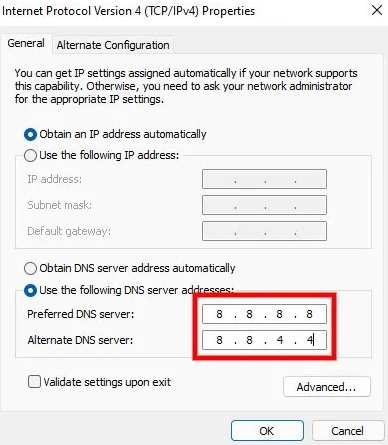
The second solution is to change your DNS servers to Google’s.

A lot of users managed to fix the “internal exception java.net.socketexception connection reset” error from this method.

Here’s a step by step guide on how to change your DNS servers:

  • Firstly, go to the Control Panel.
  • Click on “Network and Internet”.
  • Select “View network status and tasks”.
  • Now, click on “Ethernet” next to “Connections”.
  • Click on “Properties”.
  • Select “Internet Protocol Version 4 (TCP/IPv4)”.
  • Select “Use the following DNS server addresses”.
  • Now, enter “8.8.8.8” as your preferred DNS server.
  • Enter “8.8.4.4” as your secondary DNS server.

After completing it, reboot your PC or computer and try joining the Minecraft server again.

This time, the “connection reset” error will not appear.

Otherwise, you can move on to the next method.

# 3: Uninstall Hamachi

If Hamachi is already installed, you have to uninstall it.

A Reddit user reported that Hamachi was the main cause of the Java error in Minecraft.

After uninstalling Hamachi, the error was fixed.

Here’s a step by step guide on how to uninstall Hamachi:

  1. Open the Control Panel, search for Hamachi, and uninstall it.
  2. After that, Run the Command Prompt as an administrator.
  3. Type “netsh interface tcp show global”.
  4. Check if “Receive Window Auto-Tuning Level” is disabled. If it is disabled, type, “netsh interface tcp set global autotuninglevel=normal” to enable it.
  5. After that, type, “netsh interface tcp set global rss=enabled”.
  6. If both “netsh interface tcp set global autotuninglevel=normal and “netsh interface tcp set global rss=enabled” return with an “OK”, then you’re good to go.

It will increase your download speed too.

If this solution does not fix the error, you can use the final solution below.

# 4: Reduce your render distance

The last way is to reduce your render distance in Minecraft.

By reducing the graphic settings, you can also fix the lag in Minecraft.

Firstly, go to Minecraft and join a single-player map.

After getting in Minecraft, click “Esc” button from your keyboard, and click on “Options…”.

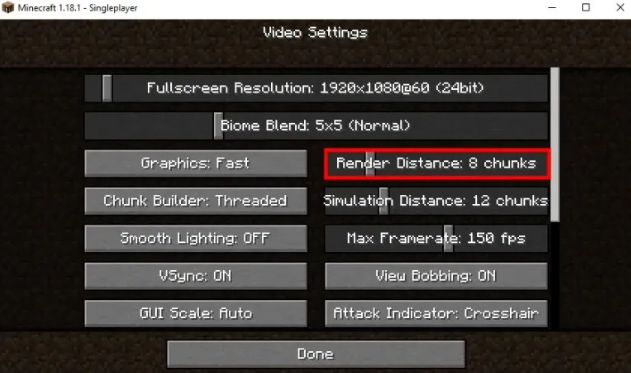
To change the video settings, select “Video Settings”.

Reduce your render distance to 8 chunks and below.

To reduce your simulation distance, you can set your “Graphics” to “Fast”, turn off “Smooth Lighting”.

After going through this process, Minecraft will be less laggy and the “internal exception java.net.socketexception connection reset” error will be fixed.

Final Words

The Java Socket Exception error (connection lost) can occur even if you have a good internet connection.

Microsoft does know about the error.

However, there is no solution provided by them.

Additionally, there isn’t a one-size-fits-all solution as every device is different from other devices.

Therefore, the best move is to try each of the methods mentioned in this guide to fix the error.

Just remember that using a free VPN might cause lagging in Minecraft.

You need to use the premium or paid plan if you want faster internet speed.

If using a VPN fixes the “internal exception java.net.socketexception connection reset” error, then it is highly recommended to go for the premium plan.

In the worst case, you can use another device to play Minecraft.

What’s Next

How to Fix “Multiplayer is disabled” in Minecraft

Funny, Cool, And Best Gaming Names

Good, Cool, And Best Xbox Names For Your Gamertag

Arsalan Rauf
Arsalan Rauf

Arsalan Rauf is an entrepreneur, freelancer, creative writer, and also a fountainhead of Green Hat Expert. Additionally, he is also an eminent researcher of Blogging, SEO, Internet Marketing, Social Media, premium accounts, codes, links, tips and tricks, etc.

www.greenhatexpert.com

Filed Under: Gaming, How to

How to Find Clothes ID in Roblox

Last Updated on August 26, 2022 By Arsalan Rauf

Every piece of clothing in Roblox contains a unique ID/code.

In the game, you can identify each piece of clothing with the help of the ID.

Roblox contains clothing, accessories, body parts, and so on.

The clothing has shirts, t-shirts, and pants.

Accessories in the game are head, face, neck, and so on.

Same as clothing, each accessory has a unique ID too.

However, a lot of users do not know how to find the clothing or accessory ID.

In this post, I will guide you on how to find clothes ID/code in Roblox such as shirts, t-shirts, and pants, in the desktop and mobile versions of the game.

How to Find Clothes ID in Roblox

To find clothes ID in Roblox, the first thing is to go to the Roblox website and tap on “Continue in browser” if you’re on a mobile device.

After doing that, sign in to your account, search for the clothing in the avatar shop, tap on the URL, and copy the ID.

When you tap on the clothing’s URL, it will show you an ID (e.g. 7727872690).

Highlight the ID and copy the ID to your clipboard and tap on “Copy”.

Just remember that you will not be able to copy clothes ID in the Roblox mobile app.

The reason behind it is that there isn’t a URL field in the Roblox mobile app.

You will have to use the browser version of Roblox for this purpose.

If you’re using an android device, you need to go to a browser like Chrome or Safari.

After that, go to Roblox in your browser and go to the piece of clothing.

As the browser version of Roblox will come with a URL field, you can copy any clothes ID/code from it.

Here’s a step by step guide on how to find clothes ID in Roblox:

Step 1. Visit the Roblox website

To write this guide, I will be using a mobile device. Therefore, you’ll have to use Safari or Chrome for this.

The first thing you need to do is to open a browser and go to the Roblox website.

Firstly, go to a browser like Google Chrome or Safari.

The Roblox mobile app cannot be used for this.

The reason behind it is that the Roblox mobile app does not contain a URL field.

Therefore, you will not be able to copy IDs.

After reaching the browser, search for the term “Roblox” on Google.

After that, tap on “Roblox” to go to the website of Roblox.

Step 2. Tap on “Continue in browser”

After tapping on “Roblox”, it will take you to the Roblox website.

As you’re on a mobile device, a couple of options will be visible.

The options are “Continue in App” and “Continue in browser”.

Avoid tapping on “Continue in App” because if you did, you won’t be able to copy your clothes ID there.

You need to tap on “Continue in browser” to go to Roblox in your browser instead.

Step 3. Log in to your Roblox account

After tapping on “Continue in browser”, it will take you to the login page of Roblox.

Now, the next thing is to log in to your Roblox account.

If using your email address to create a new Roblox account, try logging in with it.

In the “Username/Email/Phone” field, you need to provide your username, email address, or phone number.

After that, enter your password in the “Password” field.

In the end, tap on “Log In” to sign in to your Roblox account.

If you used Facebook to create your Roblox account, so use the “Facebook” option for it.

Step 4. Tap on “Avatar Shop”

After logging in to your Roblox account, it will be on the home page.

There are four options on the top navigation bar.

The options are “Discover”, “Avatar Shop”, “Create”, and “Robux”.

To visit the avatar shop, you need to tap on “Avatar Shop”.

The next thing is to search for the clothing in the avatar shop.

Step 5. Search for the clothing

After tapping on “Avatar Shop”, it will take you to the avatar shop.

A search bar will be visible in the avatar shop.

First of all, try to search for the clothing that you want to locate from the search bar.

For instance, if you want to find the “Halloween” shirt, use the term to search for it.

After that, you need to tap on the “Halloween” shirt to open it.

Step 6. Tap on the URL

After tapping on the clothing, additional information will be shown.

The info includes how much it costs, its type, genre, and so on.

The clothes ID is located in the URL and you can see it.

As you are using a browser that is why you will be able to see the clothes ID.

To see the clothes ID, you need to tap on the URL at the top of the page.

Step 7. Copy the clothes ID

After tapping on the URL at the top of the page, the clothes ID will be visible to you.

The clothes ID contains the number in the URL.

It will be found between the “catalog” and the name of the clothing.

Let’s suppose that the URL of the clothing is “https://www.roblox.com/catalog/1234567/Black-T”

If so, “1234567” is the clothing ID.

First of all, highlight the numbers in the URL.

When you do that you will see two options which are “Cut” and “Copy”.

To copy the ID of clothes, you need to tap on “Copy”.

Just remember that you have to only copy the numbers and nothing else.

I hope that you have learned how to find and get clothes ID in Roblox!

Final Words

Just remember that you can only copy IDs/codes in Roblox if you’re on the browser/desktop version of it.

If you’re on the Roblox mobile app instead of the desktop, you won’t be able to see the ID of an item.

The reason behind it is that the Roblox mobile app does not support a URL field.

Therefore, you should use a browser to open Roblox if you’re using a mobile device.

The browser can be used as per your choice like Safari or Chrome.

So, it will be easy to copy Roblox IDs on your computer because the URL field is always found there.

However, if you don’t have a computer, for now, you can use an alternative option that is, to open Roblox in your browser.

What’s Next

Good, Aesthetic, and Cute Roblox Usernames

How to Get Shaders on Roblox

How to Get Your Hacked Roblox Account Back

Arsalan Rauf
Arsalan Rauf

Arsalan Rauf is an entrepreneur, freelancer, creative writer, and also a fountainhead of Green Hat Expert. Additionally, he is also an eminent researcher of Blogging, SEO, Internet Marketing, Social Media, premium accounts, codes, links, tips and tricks, etc.

www.greenhatexpert.com

Filed Under: Gaming, How to

How to “Use the Kusava to open up the path” in Genshin Impact

Last Updated on August 26, 2022 By Arsalan Rauf

Genshin Impact contains multiple missions/quests that you need to complete for rewards.

The game also contains side quests, cutscenes, stories, and so on.

Some quests may look easy to you, but they are very hard in reality.

For instance, you might not be able to solve a puzzle.

However, the solution to the puzzle is clear.

In other cases, some puzzles or tasks are hard to complete as there are little or no hints for them.

A task that you need to perform in game is to use the Kusava to open up the path.

However, a lot of players have no idea what to investigate or interact with.

The reason behind it is that you will not get any directions.

In this post, I will guide you on how to “Use the Kusava to open up the path” in Genshin Impact.

How to “Use the Kusava to open up the path” in Genshin Impact

Here are the steps on how to “Use the Kusava to open up the path ” in Genshin Impact

  1. Go to the path west of Cinnabar Cliff.
  2. Access your inventory.
  3. Select Kusava > Switch.
  4. Aim the Kusava at the statue for a few seconds.
  5. To fix it, attack the statue.

To open up the path, you have to go to it, select the Kusava, and utilize it against the broken statue.

The Kusava is a gadget that will help you to use the power of Aranara.

“Fatty fruit, bitter fruit. A temporary home for Aranara memories. Kusave makes Aranara strong”.

After aiming the Kusava at the statue for a few seconds, you’ll receive the “The Bitter Fruit of Dreams” achievement.

The next step is to attack the statue to fix it and complete the objective.

The next task is to go inside the cave.

What’s Next

Genshin Impact Usernames Ideas

How to “Complete the trial of the Phantasmal Seed” in Genshin Impact

How to “Proceed to the location shown in the painting” in Genshin Impact

Arsalan Rauf
Arsalan Rauf

Arsalan Rauf is an entrepreneur, freelancer, creative writer, and also a fountainhead of Green Hat Expert. Additionally, he is also an eminent researcher of Blogging, SEO, Internet Marketing, Social Media, premium accounts, codes, links, tips and tricks, etc.

www.greenhatexpert.com

Filed Under: Gaming, How to

How to “Proceed to the location shown in the painting” in Genshin Impact

Last Updated on August 26, 2022 By Arsalan Rauf

Genshin Impact contains multiple missions/quests that you need to complete for rewards.

The game also contains side quests, cutscenes, stories, and so on.

Some quests may look easy to you, but they are very hard in reality.

For instance, you might not be able to solve a puzzle.

However, the solution to the puzzle is clear.

In other cases, some puzzles or tasks are hard to complete as there are little or no hints for them.

A task that you need to perform in game is to proceed to the location shown in the painting.

However, a lot of players have no idea what to investigate or interact with.

The reason behind it is that you will not get any directions.

In this post, I will guide you on how to “Proceed to the location shown in the painting” in Genshin Impact.

How to “Proceed to the location shown in the painting” in Genshin Impact

Here are the steps on how to “Proceed to the location shown in the painting” in Genshin Impact

  1. Go to the “Statue of The Seven – Dendro” north of Vanarana.
  2. Dig beside the statue.
  3. To claim its rewards, open the Common Chest.

The painting’s location is in the “Statue of The Seven – Dendro” north of Vanarana.

To reveal the Common Chest, you have to dig next to the statue.

After opening the Common Chest, you’ll obtain exploration knowledge.

“Vanarana plays host to a mysterious mailbox that will sometimes show strange scenes”.

“According to your experiences traveling with Paimon, treasure might be found in locations that specifically show up in images you find…”.

In addition, you will also receive 3 Fine Enhancement Ore, Lucky Dog’s Eagle Feature, Adventure EXP, Dendro Sigil, and 980 Mora.

The next thing is to go back to Aranara’s cabin.

What’s Next

Genshin Impact Usernames Ideas

How to “Play the Rhythm of the Great Dream” in Genshin Impact

How to “Complete the trial of the Phantasmal Seed” in Genshin Impact

Arsalan Rauf
Arsalan Rauf

Arsalan Rauf is an entrepreneur, freelancer, creative writer, and also a fountainhead of Green Hat Expert. Additionally, he is also an eminent researcher of Blogging, SEO, Internet Marketing, Social Media, premium accounts, codes, links, tips and tricks, etc.

www.greenhatexpert.com

Filed Under: Gaming, How to

How to “Complete the trial of the Phantasmal Seed” in Genshin Impact

Last Updated on August 26, 2022 By Arsalan Rauf

Genshin Impact contains multiple missions/quests that you need to complete for rewards.

The game also contains side quests, cutscenes, stories, and so on.

Some quests may look easy to you, but they are very hard in reality.

For instance, you might not be able to solve a puzzle.

However, the solution to the puzzle is clear.

In other cases, some puzzles or tasks are hard to complete as there are little or no hints for them.

A task that you need to perform in game is to complete the trial of the Phantasmal Seed.

However, a lot of players have no idea what to investigate or interact with.

The reason behind it is that you will not get any directions.

In this post, I will guide you on how to “Complete the trial of the Phantasmal Seed” in Genshin Impact.

How to “Complete the trial of the Phantasmal Seed” in Genshin Impact

Here are the steps on how to “Complete the trial of the Phantasmal Seed” in Genshin Impact

  1. Visit “Vanarana, Sumeru. The World of Aranara”.
  2. To open your inventory, click on the backpack icon.
  3. Select “Vintage Lyre”.
  4. Click on “Switch” to equip it.
  5. Move to the light beam.
  6. Play the Lyre and select the lighted-up notes.
  7. The correct order will be “fa, mi, so, fa, do”.
  8. Walk through the first Arch.
  9. Follow and collect the green particles.
  10. Grapple the bright symbols in the air thrice (above the blue flowers).
  11. Go ahead to follow and collect the green particles.
  12. Go to the second Arch and offer Phantasmal Seeds to it.

#1 Tip: You have to follow the green particles and blue flowers.

#2 Tip: You have to grapple the bright symbols in the air above the blue flowers.

After selecting the lighted-up notes, it will play a cutscene.

When a cutscene will be played, your character will play the Lyre in it.

It will change your objective from “play the Rhythm of the Great Dream at the designated location” to “Go through the arch”.

It seems to be a lot of users are unable to view the lighted-up notes.

This happens when they select the wrong Lyre.

If you’re encountering the same issue, you have to switch to the “Vintage Lyre” or another Lyre.

After playing the Lyre with the help of the correct notes, you need to walk through the Arch and follow the green particles until you arrive at the second Arch.

After reaching the second Arch, offer Phantasmal seeds to it in order to complete the objective.

What’s Next

How to “Collect Phantasmal Seeds” in Genshin Impact

How to “Play the Rhythm of the Great Dream” in Genshin Impact

Genshin Impact Usernames Ideas

Arsalan Rauf
Arsalan Rauf

Arsalan Rauf is an entrepreneur, freelancer, creative writer, and also a fountainhead of Green Hat Expert. Additionally, he is also an eminent researcher of Blogging, SEO, Internet Marketing, Social Media, premium accounts, codes, links, tips and tricks, etc.

www.greenhatexpert.com

Filed Under: Gaming, How to

How to “Collect Phantasmal Seeds” in Genshin Impact

Last Updated on August 26, 2022 By Arsalan Rauf

Genshin Impact contains multiple missions/quests that you need to complete for rewards.

The game also contains side quests, cutscenes, stories, and so on.

Some quests may look easy to you, but they are very hard in reality.

For instance, you might not be able to solve a puzzle.

However, the solution to the puzzle is clear.

In other cases, some puzzles or tasks are hard to complete as there are little or no hints for them.

A task that you need to perform in game is to collect phantasmal seeds.

However, a lot of players have no idea what to investigate or interact with.

The reason behind it is that you will not get any directions.

In this post, I will guide you on how to “Collect phantasmal seeds” in Genshin Impact.

How to “Collect phantasmal seeds” in Genshin Impact

Here are the steps on how to “Collect phantasmal seeds” in Genshin Impact

  1. Go through the first Arch after playing the Lyre.
  2. Follow and collect the green particles.
  3. Grapple the bright symbol in the air thrice (above the blue flowers).
  4. Go ahead to follow and collect the green particles.
  5. Walk to the second Arch and offer Phantasmal Seeds.

After playing the Lyre with the help of the correct notes, you need to walk through the Arch.

When you walk through the Arch, here are the words of Paimon: “Eh? It looks like something’s coming out… seems like Elemental Energy…”.

After that, your goal is to complete the trial of the Phantasmal Seed and collect 15/15 particles.

Tip: Follow the green particles and the blue flowers to accomplish the objective in the game.

What’s Next

How to “Go through the arch” in Genshin Impact

How to “Play the Rhythm of the Great Dream” in Genshin Impact

Genshin Impact Usernames Ideas

Arsalan Rauf
Arsalan Rauf

Arsalan Rauf is an entrepreneur, freelancer, creative writer, and also a fountainhead of Green Hat Expert. Additionally, he is also an eminent researcher of Blogging, SEO, Internet Marketing, Social Media, premium accounts, codes, links, tips and tricks, etc.

www.greenhatexpert.com

Filed Under: Gaming, How to

How to “Go through the arch” in Genshin Impact

Last Updated on August 26, 2022 By Arsalan Rauf

Genshin Impact contains multiple missions/quests that you need to complete for rewards.

The game also contains side quests, cutscenes, stories, and so on.

Some quests may look easy to you, but they are very hard in reality.

For instance, you might not be able to solve a puzzle.

However, the solution to the puzzle is clear.

In other cases, some puzzles or tasks are hard to complete as there are little or no hints for them.

A task that you need to perform in game is to go through the arch.

However, a lot of players have no idea what to investigate or interact with.

The reason behind it is that you will not get any directions.

In this post, I will guide you on how to “Go through the arch” in Genshin Impact.

How to “Go through the arch” in Genshin Impact

Here are the steps on how to “Go through the arch” in Genshin Impact

  1. Move to “Vanarana, Sumeru. The World of Aranara”.
  2. To open your inventory, select the backpack icon.
  3. Select “Vintage Lyre”.
  4. Click on “Switch” to equip it.
  5. Move towards the light beam by walking.
  6. Play the Lyre and select the lighted-up notes.
  7. The order will be “fa, mi, so, fa, do”.
  8. Walk through the first Arch.
  9. Follow and collect the green particles.
  10. Grapple the bright symbol in the air thrice (above the blue flower).
  11. Continue to follow and gather the green particles.
  12. Move to the second Arch by walking and offer Phantasmal Seeds.

After selecting the lighted-up notes, it will play a cutscene.

When a cutscene will be played, your character will play the Lyre in it.

The goal will be changed from “play the Rhythm of the Great Dream at the designated location” to “Go through the arch”.

It seems to be a lot of users are unable to view the lighted-up notes.

This happens when they select the wrong Lyre.

If you’re facing the same issue, you have to switch to the “Vintage Lyre” or another Lyre.

After playing the Lyre according to the lighted-up notes, walk to the arch and follow the green particles until you go to the second Arch.

What’s Next

Genshin Impact Usernames Ideas

How to “Play the Rhythm of the Great Dream” in Genshin Impact

How to Unlock the Coordinates of Sun and Rain Domain in Genshin Impact

Arsalan Rauf
Arsalan Rauf

Arsalan Rauf is an entrepreneur, freelancer, creative writer, and also a fountainhead of Green Hat Expert. Additionally, he is also an eminent researcher of Blogging, SEO, Internet Marketing, Social Media, premium accounts, codes, links, tips and tricks, etc.

www.greenhatexpert.com

Filed Under: Gaming, How to

  • « Previous Page
  • 1
  • …
  • 60
  • 61
  • 62
  • 63
  • 64
  • …
  • 81
  • Next Page »


Recent Posts

  • Free DeepSeek Accounts 2026
  • Free Zoho Mail Accounts 2026
  • Acudepot Discount Codes 2026
  • Free Blackshot Accounts 2026
  • Free GMX Email Accounts 2026
  • Songtrust Discount Codes 2026
  • Uzicases Discount Codes 2026
  • Cardillo Promo Codes 2026
  • Free DriverFix License Keys 2026
  • Avast Secureline VPN Activation Codes 2026

Recommended Posts

Create a Gmail Account Without Phone Number

Free Course Hero Account

Crunchyroll Accounts

Cracked Apps

Free Pokemon Go Accounts
Onlyfans Free Accounts
Free Chegg Accounts
Free Paypal Accounts
Free Gmail Accounts
Funny Steam Names

Categories

  • Apps
  • Apps for PC
  • Blogging
  • Discord
  • Facebook
  • Gaming
  • Grammar
  • Guide
  • How to
  • Instagram
  • Messaging
  • OnlyFans
  • Pinterest
  • Reddit
  • SEO
  • Snapchat
  • Social Media
  • Spotify
  • Steam
  • Telegram
  • TikTok
  • Twitch
  • Twitter
  • Whatsapp
  • WordPress
  • YouTube
  • Home
  • Social Media
  • Messaging
  • About
  • Submit Guest post